• KultureGeek
  • Comparateur de prix
       
iPhoneAddict
 iAddictv5Notre Application iPhone/iPad
  • Accueil Apps
  • Actualité Apple
  • Keynote Apple
  • Firmwares & iTunes
  • Contactez-nous
Accueil » Liste des Apps » Apps Mac » Graphisme et design » Sketch
2025.3.2 macOS €Gratuit Sketch B.V. 0 0 Sketch is a complete design toolkit. With a native Mac app for design and prototyping, and web-based tools to share, get feedback and handoff. A native macOS app for design and prototyping — Powerful tools built for designers, by designers —...
Sketch

Sketch

macOS / Graphisme et design

Gratuit
Obtenir sur l'App Store

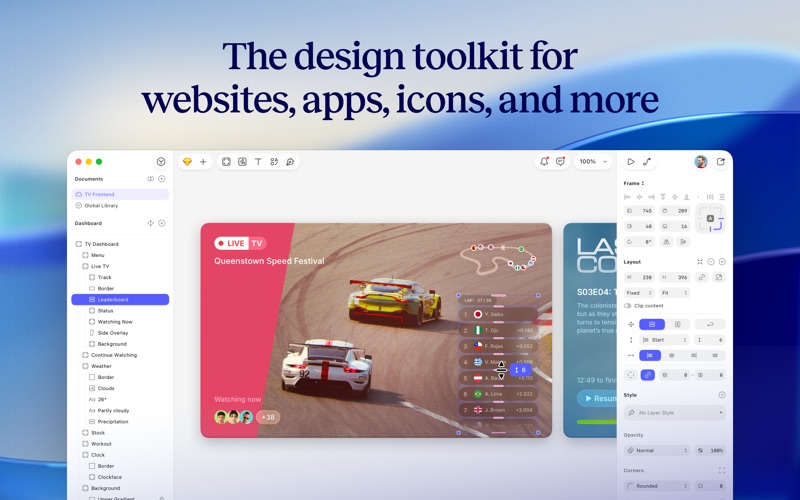
Sketch is a complete design toolkit. With a native Mac app for design and prototyping, and web-based tools to share, get feedback and handoff.

A native macOS app for design and prototyping
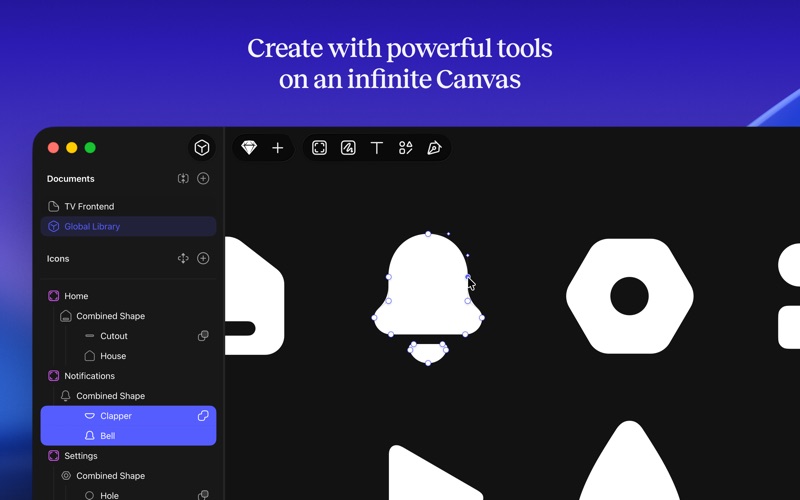
— Powerful tools built for designers, by designers
— Nestable frames and flexible stack layouts
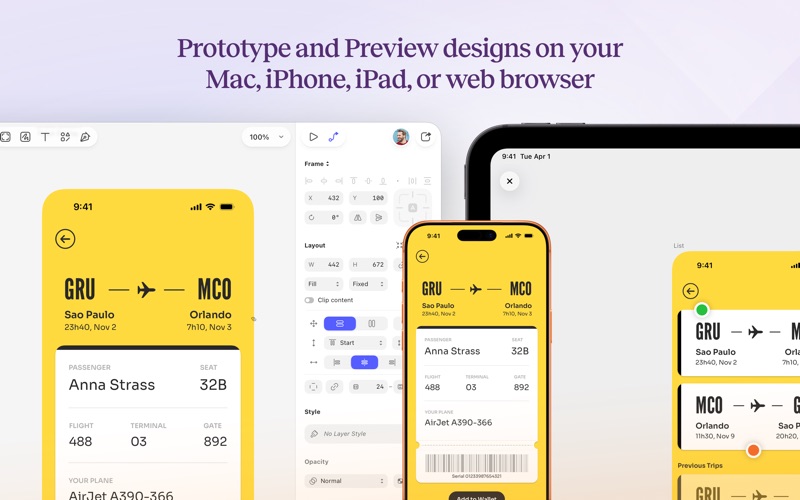
— Fast, immersive prototyping to bring your ideas to life
— Shared Libraries, styles and components to scale your work
— Full control over color profiles, including P3 support
— Variable and OpenType font support
— Offline and local file support
— Ready for real-time collaboration, or working solo

A flexible web app for feedback, sharing and handoff
— Store, sync and share documents
— Document and project permissions
— Easy Workspace admin
— Annotate documents with feedback
— File version history
— Share Libraries, components and templates
— Developer handoff tools
— Test prototypes in any browser
— View, comment and handoff for free

With our free companion app, Sketch — View and Mirror, you can view designs, mirror from your Mac, and play prototypes on your iPhone or iPad.

---

CREATE WITH EASE
Sketch is perfect for beginners and professional designers. With powerful tools built for designers, by designers, you can bring your ideas to life. Whether you’re crafting a stunning logo, or designing apps and infographics, you do it effortlessly.

POWERFUL LAYOUT TOOLS
With nestable, stylable frames, you have infinite flexibility when building screens, UIs and more. Add stack layouts to your designs to make them adapt to their content, or adapt content to their size.

FAST, INTUITIVE PROTOTYPING
Test your ideas quickly and efficiently with our intuitive prototyping tools. Create immersive prototypes in just a few clicks. Test and share your concepts easily, with a link to a browser-based prototype, or in our native iOS and iPadOS app.

FULL CONTROL OVER YOUR DESIGNS
Get complete control over every aspect of your designs. Sketch supports a variety of color profiles, including P3, for vibrant and true-to-life visuals. With variable and OpenType font support, you can customize your typography too.

WORK FASTER WITH THE COMMAND BAR
Invoke almost any action, find and insert components, and so much more — all without leaving your keyboard. The Command Bar gives you a faster way to do almost anything in Sketch.

EFFICIENT DOCUMENT MANAGEMENT
Easily store, sync, and share your design documents with your Workspace. With intuitive admin tools and a browsable document version history, you can track changes and collaborate with ease.

FULL OFFLINE SUPPORT
Work when and where inspiration strikes! Our design software supports offline access and local file management, so you can create without interruptions.

EXPLORE, CREATE, AND SHARE
Our tools make it easy to provide feedback, share your work, and hand off projects seamlessly to developers, making it easy for you to collaborate with others.

GET STARTED TODAY
Download Sketch today to get all the power of professional design tools combined with user-friendly features. Whether you’re a seasoned designer or just starting, our app is your go-to solution for all your graphic design needs.

Sketch comes with a 30-day free trial. After that, you can sign up for flexible subscription, which includes your own Workspace to store and sync documents, wherever you use Sketch.

Terms of Service: https://www.sketch.com/tos/
Privacy Policy: https://www.sketch.com/privacy/

En voir plus...

Quoi de neuf dans la dernière version ?

Improvements
- Color hex fields in the Inspector now support CSS color names. We also support `clear` and `transparent`, which both render black at 0% opacity. Supported single characters also resolve to their full hex code.
- You can now swap Text Styles for text layers that are part of a combined shape.
- Toolbar items, especially in the Components view, have better contrast in dark mode for macOS Sequoia and earlier.

Changes
- Rename is now back in the context menus for both the layer list and the canvas.
- Share options (AirDrop, Messages, share extensions, etc.) are back in the Export panel in the Inspector.
- The export presets menu in the Inspector now once again includes the option to create a new preset. We’ve also tidied up this menu a bit.
- Math operations now work similarly to how they did in Barcelona and earlier versions again. If you enter a position value beginning with a “-” or “+”, we’ll treat it as an absolute value for single selections. For multi-selections, we’ll treat it as a relative value (e.g. entering “+10” for a multi-selection will move the selection by 10”). Entering “!” no longer has any effect.
- We now sort Symbol color overrides in three ways. First, by the number of times the color appears in the Symbol(s), with the most common colors at the top. Second, by the order the override appears in the Symbol source (usually the layer order). Finally, by the color description (usually its hex code).

Fixes
- Fixes a bug where exports you create by dragging image previews out of the Inspector would include the entire nested naming structure in their filename. It now correctly respects that nested structure by creating the relevant folders.
- Fixes a bug where templates inside folders would no longer open a new copy when you double-clicked on them.
- Fixes a bug that stopped the Reset Overrides button from appearing if you had selected a parent Symbol or nested text layer.
- Fixes a bug that blocked you from changing the end cap style of dashed borders in closed shapes.
- Fixes a bug that stopped you from using the Escape key to close the Rename Layers sheet.
- Fixes a bug that meant dashed border settings did not apply individually to a multi-selection when you scrubbed the input fields.
- Fixes a bug that incorrectly showed the option to add multiple shadows to groups (via the plus button, or duplicate/paste). Groups only support one shadow.
- Fixes a bug where the JPEG file extension would differ depending on the export method you used. We now consistently export as .jpg.
- Fixes a bug which stopped the Copy CSS Attributes option from working correctly in the Components view.
- Fixes a bug that caused the Reset Overrides to disappear after you changed an interaction target on a Symbol instance.
- Fixes a bug that meant you couldn’t use the native macOS color panel to change colors when you had an Inspector panel open.
- Fixes a bug where the style picker would not always remember the style you applied to the current selection.
- Fixes a bug that stopped the layer list in focus mode from expanding a frame when you selected a layer within it.
- Fixes a bug that stopped the multi-layer rename dialog from being resizable. You can resize it once again, and it will remember its size.
- Fixes a bug which meant active buttons in the toolbar would not respect your system accent color choice.
- Fixes a bug where individual corner radii fields could appear blank.
- Fixes a bug that stopped us from remembering last-used text between documents in all cases.
- Fixes a bug where advanced border settings would not work in the Components view.
- Fixes a bug that incorrectly disabled sizing controls for nested symbols within stack-based symbol instances.
- Fixes a bug that caused export previews in the Inspector for SVG or PDF exports to look squashed.
- Fixes a bug that meant we didn’t always recognize the first digit you entered in a text field for multi-selections.

  • Screenshot #1 pour Sketch
  • Screenshot #2 pour Sketch
  • Screenshot #3 pour Sketch

D'autres applications du développeur

Sketch Mirror
Sketch Mirror
/ iOS Universel

Note

(0 note)

Détails sur l'application

Version
2025.3.2
Taille
76 Mo
Version minimum de macOS
14.0.0
Dernière mise à jour
15/12/2025
Publié par
Sketch B.V.

Newsletter App Store

Recevez chaque jour les meilleures promos

Actualité Apple

Image Apple TV annule sa série The Last Frontier après une saison
Apple TV annule sa série The Last Frontier après une saison
Image iPhone Fold : les dimensions et une maquette se dévoilent
iPhone Fold : les dimensions et une maquette se dévoilent
Image Sécurité : Apple cache iOS 18.7.3 pour forcer l’installation d’iOS 26
Sécurité : Apple cache iOS 18.7.3 pour forcer l’installation d’iOS 26
Image Apple ne signe plus iOS 26.1 : restauration et mise à jour bloquées
Apple ne signe plus iOS 26.1 : restauration et mise à jour bloquées
Partenaires : Actualité iPhone - Culture Geek
©2009-2025 i2CMedia | A propos |