Email Signature Generator
macOS / Economie et entreprise
Every work email you send is a first impression. Email Signature Generator gives you a signature that tells people who you are, what you do, and how to reach you — so you look credible and get replies. No design skills, no code, no subscription.
HOW IT WORKS
1. Fill in your details.
2. Pick a style. Previews show your own name and colours, not someone else's.
3. Copy, then paste into Gmail, Outlook, or Apple Mail. Done.
WHAT GOES IN IT
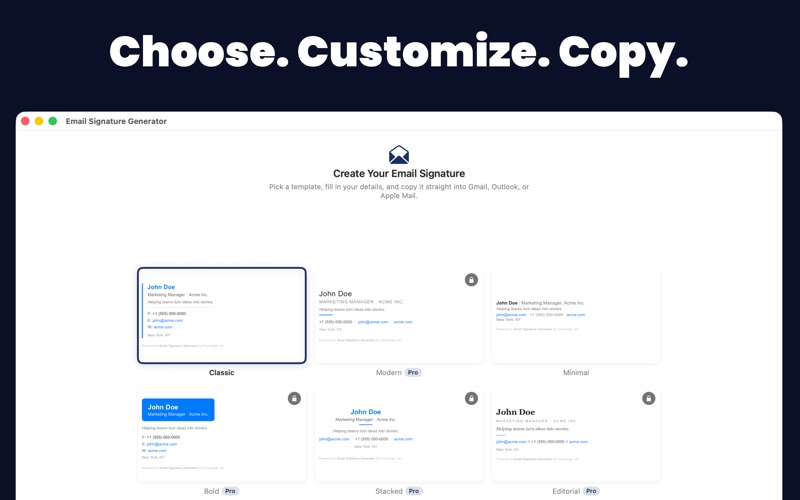
• 6 designs: Classic, Modern, Minimal, Bold, Stacked, and Editorial.
• Your brand colour and a choice of 7 email-safe fonts.
• Name, pronouns, job title, company, tagline, email, phone, mobile, website, and location.
• Logo and headshot.
• Social links — 20+ platforms including LinkedIn, Instagram, GitHub, WhatsApp, and YouTube.
• Fine print for a confidentiality notice or the company registration details some countries require.
Note: logos and photos need to be at a public web address. Email can't carry a picture from your Mac.
GETTING IT INSTALLED — THE PART THAT USUALLY GOES WRONG
• Buttons that open Gmail's settings, Outlook, or Apple Mail for you.
• Step-by-step guides that include the easy-to-miss setting — the one that decides whether your signature actually appears on the emails you send.
• A "Doesn't look right?" section covering five things that commonly surprise people.
• Export an .html file any time for a copy you can keep.
SEE IT THE WAY THEY WILL
• A live preview updates as you type, shown at the foot of an email.
• Switch between desktop and phone width, and light and dark.
• See it with images blocked — how many people meet you before they choose to load them.
• Click any link in the preview to check it works.
• Phone numbers are tap-to-call for anyone reading on a phone.
NEVER SEND THE OLD ONE BY MISTAKE
Changed your job title and forgot to re-paste? A line under the preview tells you your email app is still sending the old version, with a Copy Again button right there. While a signature is unfinished, it tells you what's still worth adding.
QUIET CHECKS ALONG THE WAY
The app catches small things before your recipients do: a typo in your email, web or social address; a photo that will look stretched in Gmail and Outlook; an image address that won't load; a social row you haven't filled in yet; and a brand colour too pale or too dark to read as text — that one is adjusted for your name and links automatically, while your accent lines keep the exact colour you picked.
ONE SIGNATURE ISN'T ALWAYS ENOUGH
Work, personal, side business — make as many as you need, duplicate one to create a variant in seconds, and switch between them anytime. Everything syncs across your Macs with iCloud.
BUILT FOR THE KEYBOARD
Templates with Command-1 to Command-6, copy with Command-C, new with Command-N, duplicate with Command-D, rename with Command-R, export with Shift-Command-E. VoiceOver labels throughout, with spoken announcements for copying, AI results and field checks. Copying also puts a clean plain-text version on your clipboard, so pasting into Slack or Notes gives readable text rather than code.
UPGRADE TO PRO — ONE-TIME PURCHASE, NO SUBSCRIPTION
• Unlock 4 more designs: Modern, Bold, Stacked, and Editorial.
• AI Studio: clean up your job title, suggest a tagline, or rewrite your tagline to be plainer, sharper, or more formal. It won't invent a job title you haven't given it, or make you sound more senior than you are.
• Runs entirely on your Mac with Apple Intelligence — nothing is sent anywhere. (AI Studio needs Apple Intelligence and macOS 26. Everything else works on macOS 14 and later.)
Classic and Minimal are free, forever. No account, no sign-up, no ads, no tracking.
Every signature ends with a small "Powered by Email Signature Generator" line. It's how people find us, and it stays on the free and Pro versions alike — you're welcome to delete it from your own signature after you copy it.
Stop sending bare emails. Start making every message count.
Quoi de neuf dans la dernière version ?
NEW — See what's still missing
While a signature is unfinished, that same line suggests what's worth adding: your name, your role or company, a way to reply, and a link people can follow. It's only a suggestion — once there's something in your signature, you can copy it whenever you like.
NEW — Pronouns
There's now a field for your pronouns. They appear beside your name in smaller, quieter text, so they sit alongside your name rather than compete with it.
NEW — Fine Print
Need a confidentiality notice, or your company registration details? There's now a place for them. They appear in small grey text at the foot of your signature, below your contact details.
A fresh look for your text
We've retuned the colours your signature uses, so they hold up whether your email lands on a white background or a dark one. Your name now takes your brand colour in every template except Bold, where it sits on your colour block instead — and if your colour would be hard to read as text, your name and links use an adjusted shade of it. Your accent lines keep the exact colour you chose, and in Bold the text on your colour block switches between light and dark automatically. Classic's divider line is easier to see, and text is higher-contrast throughout.
Small things that add up
• Making the window narrower no longer cuts off the sidebar or your preview.
• Fields are in a more useful order, with social links closer to the top.
• Switch templates with Command-1 to Command-6, and rename a signature with Command-R.
• The install guide now suggests sending yourself a test email — the only way to see what recipients really get — and adds a "Doesn't look right?" section covering five common surprises.
• New signatures each get their own name, instead of all being called "New Signature".
Thank you for using the app. If something doesn't look right, we'd love to hear from you.