Easy Access for Google Drive
macOS / Economie et entreprise
Easy Access for Google Drive — the fastest way to manage Google Drive and Google Docs on your Mac.
Reimagined from the ground up, Easy Access is the powerful native macOS app that puts your entire Google Drive at your fingertips. Browse,
search, upload, download, share, organize and create — with the speed of a real desktop app and the familiarity of Finder. One Google
account or ten, Easy Access turns Drive into a true Mac-first experience. No more slow browser tabs.
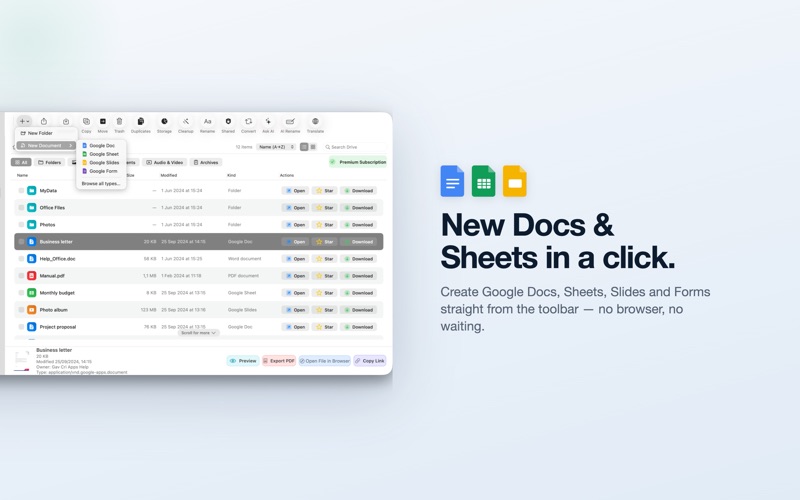
Create Google Docs, Sheets, Slides and Forms in a click, preview anything with Quick Look, and export to PDF, Word and Excel — all from one
clean, fast, native window.
POWERFUL DRIVE BROWSING
• My Drive, Starred, Shared with Me, Recent and Trash — one click away
• Lightning-fast folders with breadcrumbs and a back button
• Live search with instant filtering
• Sort by name, date or size, ascending or descending
• Filter by file type to find what you need fast
• Multi-select with checkboxes or Cmd/Shift-click
• Quick Look previews — press Space and go
• Auto-refresh keeps Drive in sync across your devices
• Smooth pagination loads thousands of files effortlessly
COMPLETE FILE MANAGEMENT
• Drag-and-drop multi-file upload with resumable transfers
• Real-time progress with cancel for uploads and downloads
• Create folders, rename, move, copy, star and organize with ease
• Trash, restore, empty Trash or permanently delete — your choice
• Open any file in your browser
• Instantly create Google Docs, Sheets, Slides or Forms
CREATE & EXPORT GOOGLE DOCS
Turn Google Docs, Sheets and Slides into the format you need:
• PDF
• Microsoft Office — DOCX, XLSX, PPTX
• OpenDocument, RTF, EPUB, HTML, CSV and plain text
• Automatic PDF conversion when previewing or downloading Google editor files
ADVANCED SHARING & PERMISSIONS
• Anyone-with-link sharing as viewer or editor
• Share with collaborators by email with custom roles
• View and revoke existing permissions in seconds
• Copy direct links to your clipboard in one click
CLEAN UP & RECLAIM SPACE
• Find duplicate files across your whole Drive
• Storage insights show what's using your space
• Surface large, old and empty items and clear them fast
PRIVATE ON-DEVICE AI
• Summarize documents and ask questions about them
• Smart AI rename and translate — processed right on your Mac
MULTI-ACCOUNT SUPPORT
Switch between personal, work and client Google Drive accounts instantly — perfect for freelancers, agencies, students and anyone juggling
more than one account.
WHY USERS LOVE EASY ACCESS
• Native macOS speed — no laggy web tabs
• Clean, intuitive, Mac-first design
• Saves hours every week on document management
• Works seamlessly with Quick Look, Finder and your Mac workflows
Easy Access offers limited features for free. Unlock everything with a subscription or a one-time Lifetime purchase.
LIFETIME — one-time purchase, as low as $39.99
• Pay once, own it forever. Price may vary by location or active promotions.
SUBSCRIPTIONS — auto-renewing, with a free trial
• Yearly $24.99 or Monthly $4.99 — price may vary by location or active promotions.
• Payment is charged to your Apple Account at confirmation of purchase.
• Subscriptions auto-renew unless cancelled at least 24 hours before the end of the current period.
• Manage or cancel anytime in your Apple Account settings; any unused portion of a free trial is forfeited when you buy a subscription.
Privacy Policy: https://gavcris.app/privacy.html
Terms of Use: https://gavcris.app/terms.html
Easy Access for Google Drive is not produced by, affiliated with, or endorsed by Google. It uses the official Google Drive API to provide
the described functionality. For the official Google Drive or Google Docs app, please visit Google's website. "Google Drive", "Google Docs"
and their logos are trademarks of Google LLC.
Quoi de neuf dans la dernière version ?
This update brings a small but meaningful refinement:
• Improved Light & Dark mode — switching appearance while the app is open now updates instantly, keeping every screen crisp, clear, and easy to read.
Thanks for using Easy Access! We're always working to make your Google Drive experience smoother.