autoExpire
macOS / Economie et entreprise
Automatically archive or delete your file and folder at the date you preset.
With autoExpire, you can be sure that your computer is always organized and never cluttered.
In the modern age, we are faced with the increasing digitalization of our lives. One effect of that is the huge volume of files we create, download, and received every day. Many of these are time-sensitive, such things as draft reports, news articles, digital receipts, invoices, coupons, event invitations, etc, are no longer useful after a specific date, and if they remain on your storage, they take up your storage space, clutters up your folders, and makes finding something useful among them close to impossible.
autoExpire will help you fix that. When you receive a file, you may set up, through autoExpire, an expiry date for the file, and the method of disposal after the date, be it archiving or simple deletion.
features:
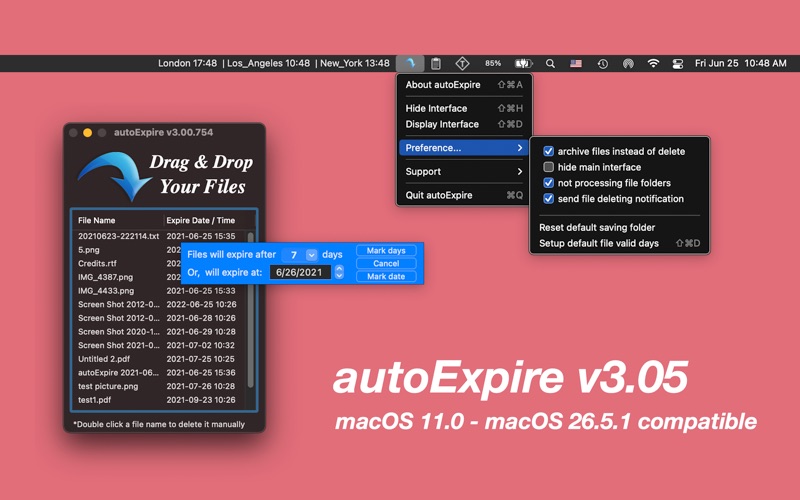
- drag & drop operation to either the user interface or the dock icon.
- all file formats are supported
- handles single files' drop, multiple files' drop, and even folders' drop.
- expiration date can be easily set, either as a specific calendar date or as the number of days from the present.
- total files count can be read out from the dock menu icon
- simple status menu access
- visibility of file list toggle-able
- support manual file deletion, just double-click file's name from the table view
- colorful and animated interface
Version History:
v2.02 -> v2.05
- add "Hide Main Interface" feature according to the user's feature request;
- make tip display during the app's first run;
- more by dragonBTV panel updated;
v2.05 -> v2.08
add options according to the user's feature request
- 7 days and 365 days added to the preset expiration list
- a cancel button was added to the day input panel in case of your canceling drag and drop
- dragonBTV panel updated
v2.08 -> v2.13
- critical bug fix upgrade for OS 10.8 users
- add user notification while files were deleted or archived (under OS 10.8 only)
- Hide / Unhide menu items added
- Sandboxed OS 10.6 - OS 10.8 compatible version
- Sandbox-compatible email technical support
- Sandbox-compatible feature request support
- Sandbox compatible "more by dragonBTV" menu and panel
v2.13 -> v2.20
- OS 10.7 - OS 10.9 compatible version
- new option added: "Do not process file folders"
- new tip alert related to "Do not process file folders"
- new menu item added "Reset all alerts"
- more by dragonBTV updated
v2.20 -> v3.00
- new version for All Mac (Apple Silicon, Intel) system
- all deprecated codes replaced
- file container folder will be reloaded automatically upon startup
- saving folder resetting function and related alerts added
- add system notification while expiring & deleting files
- notification related user alert added
- fancy and misleading animation of the interface removed
- startup tip rewritten
- support menu updated
v3.00 -> v3.02
- deprecated code rewritten
- More by dragonBTV menu updated
v3.02 -> v3.05
- app interface modified for the modern macOS 26
- App information updated for the new age-rating system
- updated for the latest macOS Tahoe 26.5.1 compatible
Quoi de neuf dans la dernière version ?
v3.02 -> v3.05
- app interface modified for the modern macOS 26
- App information updated for the new age-rating system
- updated for the latest macOS Tahoe 26.5.1 compatible