• KultureGeek
  • Comparateur de prix
       
iPhoneAddict
 iAddictv5Notre Application iPhone/iPad
  • Accueil Apps
  • Actualité Apple
  • Keynote Apple
  • Firmwares & iTunes
  • Contactez-nous
Accueil » Liste des Apps » Apps Mac » developpeurs » System Color Picker
2.2.0 macOS €Gratuit Sindre Sorhus 0 0 Pick colors from anywhere using the built-in color picker. Note: On macOS 26, a system bug causes the color sampler to sometimes pick the wrong color. The app relies on macOS's color sampler and canot fix this. ■ Features - Palettes - Recently...
System Color Picker

System Color Picker

macOS / developpeurs

Gratuit
Obtenir sur l'App Store

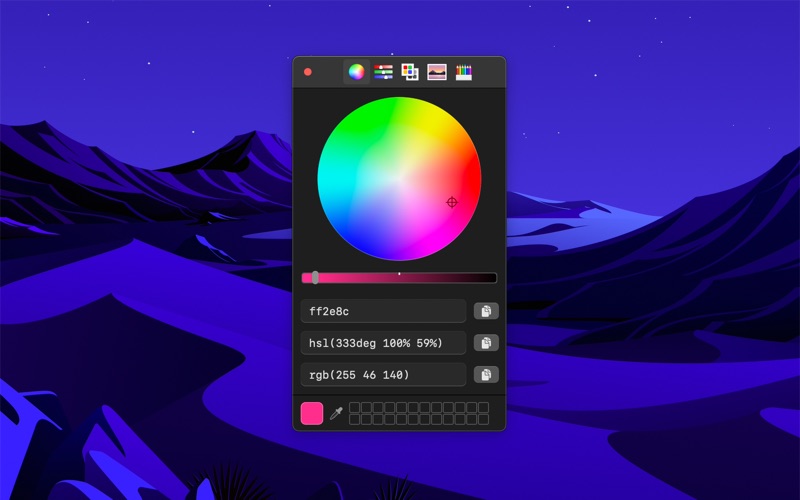
Pick colors from anywhere using the built-in color picker.


Note: On macOS 26, a system bug causes the color sampler to sometimes pick the wrong color. The app relies on macOS's color sampler and canot fix this.


■ Features

- Palettes
- Recently picked colors
- Quickly copy, paste, and convert colors in Hex, HSL, RGB, Unit RGB (0-1), OKLCH, LCH, CMYK format
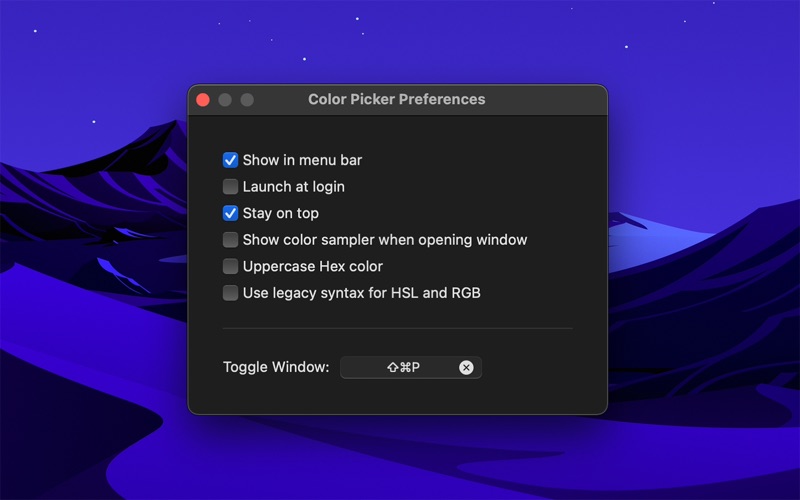
- Show as a normal app or in the menu bar
- Pick a color or toggle the window from anywhere with a global keyboard shortcut
- Make the window stay on top of all other windows
- Launch it at login (when in the menu bar)
- Hide menu bar icon
- Shortcuts support
- Import Simple Color Palette and Adobe Swatch Exchange (ASE) palettes


■ Tip

Press the Space key while using the color sampler to show the RGB values. The color sampler is a system component and it can unfortunately not show other kinds of color values.


■ Keyboard shortcuts

You can use the following keyboard shortcuts in the app:

- Pick color: Command+p
- Copy as Hex: Shift+Command+h
- Copy as HSL: Shift+Command+s
- Copy as RGB: Shift+Command+r
- Copy as Unit RGB: Shift+Command+u
- Copy as OKLCH: Shift+Command+o
- Copy as LCH: Shift+Command+l
- Copy as CMYK: Shift+Command+k
- Paste color: Shift+Command+v (In the format Hex, HSL, RGB, Unit RGB, OKLCH, LCH, or CMYK)
- Reset opacity: Control+Shift+o


■ Support

Use the feedback button in the “Help” menu in the app.

En voir plus...

Quoi de neuf dans la dernière version ?

- The app now requires macOS 26. You can get the last macOS 15 compatible version from the app's website.

  • Screenshot #1 pour System Color Picker
  • Screenshot #2 pour System Color Picker

D'autres applications du développeur

Blear
Blear
/ iOS Universel
Battery Indicator
Battery Indicator
/ macOS
Lungo
Lungo
/ macOS
HEIC Converter
HEIC Converter
/ macOS
Black Out
Black Out
/ macOS
Gifski
Gifski
/ macOS
Voir toutes les apps

Note

(0 note)

Détails sur l'application

Version
2.2.0
Taille
6.7 Mo
Version minimum de macOS
26.1
Dernière mise à jour
02/01/2026
Publié par
Sindre Sorhus

Newsletter App Store

Recevez chaque jour les meilleures promos

Actualité Apple

Image iPhone : Apple domine comme jamais le marché indien en valeur
iPhone : Apple domine comme jamais le marché indien en valeur
Image Apple TV renouvelle Vrais voisins, Faux amis pour une saison 3 avant même la diffusion de la saison 2 (+ trailer)
Apple TV renouvelle Vrais voisins, Faux amis pour une saison 3 avant même la diffusion de la saison 2 (+ trailer)
Image Affaire Epstein : le nom de Tim Cook apparaît dans des emails liés à d’anciens dirigeants de la tech (oui mais …)
Affaire Epstein : le nom de Tim Cook apparaît dans des emails liés à d’anciens dirigeants de la tech (oui mais …)
Image Apple accélère la génération vocale par IA sans altérer la qualité
Apple accélère la génération vocale par IA sans altérer la qualité
Partenaires : Actualité iPhone - Culture Geek
©2009-2026 i2CMedia | A propos |