
Gitfox
macOS / developpeurs
Gitfox is a native macOS Git client that keeps powerful Git workflows clear,
fast, and approachable. It brings your repositories, history, changes, commits,
and service accounts into one focused app that feels at home on the Mac.
## Manage Your Repositories
Keep local and hosted repositories together in a clean repository manager.
Organize projects into folders, filter quickly, see repository status at a
glance, and browse rendered Markdown READMEs with build status badges and images.
Create new repositories, clone remote projects, choose saved destinations, and
work with GitHub, GitLab, GitLab Self-Managed, Bitbucket, and Gitea accounts
without leaving the app.
## Review Changes Clearly
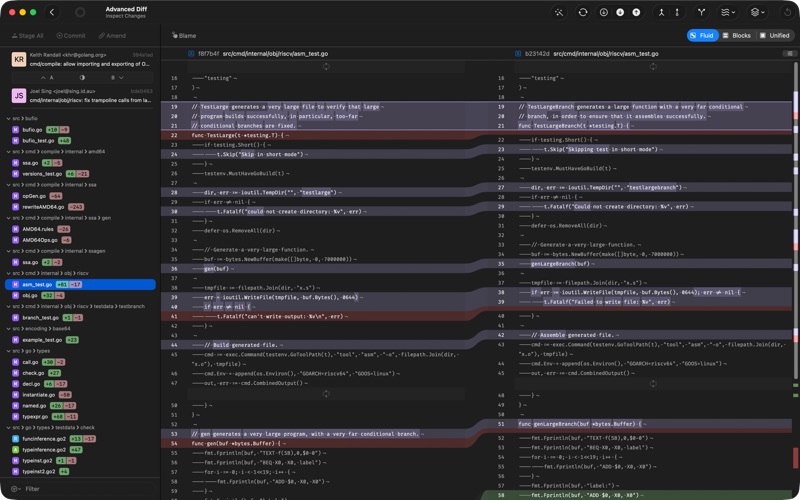
Gitfox makes diffs easy to read and easy to act on. Review text and image
changes, search inside diffs, move between changes, and see exactly what is
different before it reaches a commit. Inline highlights call out the exact edits
inside changed lines.
Stage only what belongs: a whole file, a hunk, or selected lines. Unstage just
as precisely, discard changes with a safer recovery path, and resolve conflicts
by choosing the version you want directly from the diff.
When you want a dedicated comparison tool, Gitfox integrates with external diff
and merge tools including Araxis Merge, Beyond Compare, FileMerge, Kaleidoscope,
P4Merge, JuxtaCode, Visual Studio Code, and Meld. It can also use tools already
configured in your Git settings.
## Commit With Confidence
The commit editor helps you write clean history. It restores unfinished commit
messages, offers recent messages, highlights commit syntax, supports merge
messages, and keeps subject and body length visible while you write.
Use multiple Git identities, set defaults per repository, amend commits, sign
off, adjust commit options, and commit and push in one flow.
## Understand History
Move through branch logs, the all-branches graph, tags, stashes, reflogs, commit
ranges, and file history without losing context. Search by message, author,
date, file, full text, or hash, and quickly jump to the result you need.
From the log, create branches and tags, compare branches, cherry-pick or revert
commits, manage stashes, and open blame to see who changed each part of a file.
## Handle Advanced Git Workflows
Gitfox keeps advanced work visible and deliberate:
- Interactive rebase for editing, rewording, dropping, squashing, fixing up, and
moving commits.
- Git Flow actions for features, bugfixes, hotfixes, and releases.
- Bisect sessions for tracking down the commit that introduced a problem.
- Worktree and submodule management from the repository outline.
- Drag and drop for common actions like branching, tagging, merging, rebasing,
pushing, cherry-picking, and applying stashes.
## Stay in Flow on macOS
Gitfox supports tabbed windows, Quick Look previews, Finder actions, editor and
terminal handoff, notifications for new and pushed commits, customizable
keyboard shortcuts, and a Quick Action panel for jumping straight to commands.
You can run Gitfox entirely from the keyboard, including moving between views
and panes with the arrow keys.
Project links keep issues, pull requests, and other resources close to the
repository. Add web or file links, and turn issue references in commit messages
into clickable links so project context stays connected to the code.
## Work Safely
Gitfox keeps risky operations explicit. Discards can be recoverable, destructive
actions ask for confirmation, conflict choices are clearly labeled, and
authentication issues guide you back to the right account or remote.
For everyday work and deeper recovery, reflogs, stashes, branch comparisons, and
file history help you find your way back from deleted branches, lost commits, or
other wrong turns without leaving the app.
EULA: https://www.apple.com/legal/internet-services/itunes/dev/stdeula
Quoi de neuf dans la dernière version ?
*Improved*:
- Tighten macOS runtime entitlements
- The commit window now reopens at its last size and position
- The changes outline now shows a `No Changes` label for clean worktrees
- Feedback is now sent directly through Gitfox, with diagnostics attached automatically
*Fixed*:
- Fixed a cancelled log load briefly showing an unborn-branch header