iPhoneAddict Apps
  • Actualités
  • Accueil Apps
  • iPhone
  • iPad
  • Universelles
  • Mac
  • Apple TV
KG KultureGeek
App
iPhone / iPad Télécharger iAddict v5 Mac Télécharger iAddict Mac
  • Actualités
  • Accueil Apps
  • iPhone
  • iPad
  • Universelles
  • Mac
  • Apple TV
  • Archives keynotes
  • Firmwares & iTunes
  • Contactez-nous
  • Comparateur de prix
  • KultureGeek
Accueil » Liste des Apps » Apps Mac » developpeurs » Deskcap 3
L'application n'est plus disponible sur l'App Store français
3.0.7 macOS €Gratuit Tomoyuki Okawa 0 0 - Display a Virtual Color Frame on Your Desktop - Deskcap 3 is a desktop application that lets you create a virtual frame on your desktop. Imagine a situation where you have to create a desktop movie. If you have a large display like one capable of...
Deskcap 3

Deskcap 3

macOS / developpeurs

Gratuit
Obtenir sur l'App Store
Facebook X E-mail

- Display a Virtual Color Frame on Your Desktop -

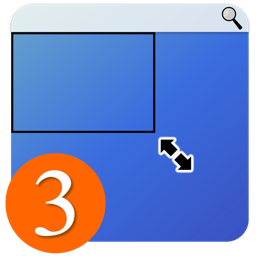
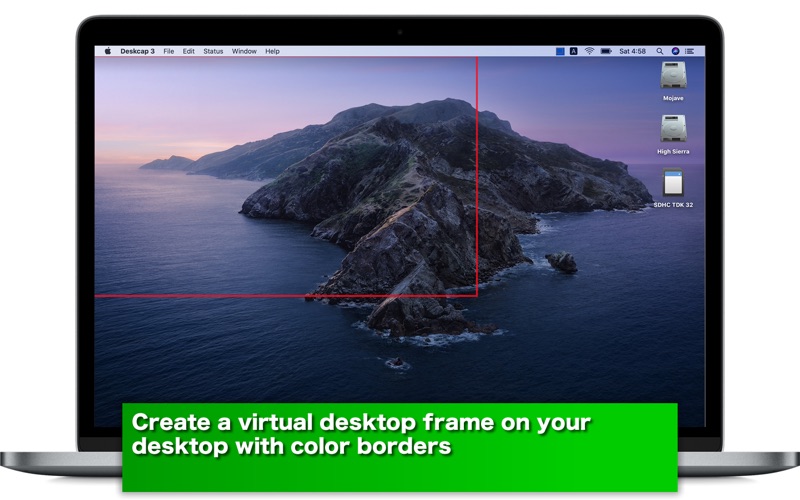
Deskcap 3 is a desktop application that lets you create a virtual frame on your desktop. Imagine a situation where you have to create a desktop movie. If you have a large display like one capable of showing 2,560 points x 1,440 points, you may only need a portion of it, say, 1,440 points x 900 points at the top left corner. In this situation, you can use Deskcap 3 to create a virtual frame so that it will cover the outside of the visible area with a color frame. You can create any number of virtual frames. The application comes with a status menu. In order to set a virtual frame, you can just select one under the status menu.


- What's new? -

1. The application has been re-written from scratch in Swift.
2. The user can now take a screenshot of the visible area of the current frame.


- Features -

1. Create a virtual work area. Save one as a preset.
2. Select one of the two frame types (solid frame or border frame) from application’s status menu. Choose a frame from application’s status menu to set a virtual work area over the desktop area.
3. Set the border width of border frames.
4. Take a screenshot of the visible area of the current frame.
5. Let the application delay in taking a screenshot by counting down numbers.
6. Languages: English only.
7. The application supports the retina display. (tested with 2014 2.6 GHz 13" MacBook Pro).
8. Application file size: 20.6 MB.
9. The application comes with a built-in 11-page user guide. Click on the button that says 'User's guide' in the Home screen.


- System requirements -

1. 10.13 (tested with 10.13.6), 10.14 (tested with 10.14.6), 10.15 (tested with 10.15.1)
2. 64-bit system


- Limitations -

1. The application is free to use for the first week. Further continuous use of this application will require a one-time purchase of an in-app product.
2. The application window is not resizable. Its size is fixed.

En voir plus...

Quoi de neuf dans la dernière version ?

1. When the application shifts from Home to the Desktop Frame screen, it can disable the new frame toolbar button.
  • Screenshot #1 pour Deskcap 3
  • Screenshot #2 pour Deskcap 3
  • Screenshot #3 pour Deskcap 3

D'autres applications du développeur

aClocks - International ClocksaClocks - International ClocksiPhoneaClocks DesktopaClocks DesktopmacOSaClocks Premium Analog ClocksaClocks Premium Analog ClocksiPhoneAllNews - Scrolling multiple RSS feedsAllNews - Scrolling multiple RSS feedsiOS UniverselAnimal Me - Make Your Selfie an AnimalAnimal Me - Make Your Selfie an AnimaliPhoneMasked Man Or Woman - Wear a Mask on Your SelfieMasked Man Or Woman - Wear a Mask on Your SelfieiPhoneVoir toutes les apps

Note

(0 note)

Détails sur l'application

Version
3.0.7
Taille
20.8 Mo
Version minimum de macOS
10.13
Dernière mise à jour
09/10/2020
Publié par
Tomoyuki Okawa

Newsletter App Store

Recevez chaque jour les meilleures promos

Actualité Apple

Image Les États-Unis ne veulent pas qu’Apple achète de la RAM chinoise
Les États-Unis ne veulent pas qu’Apple achète de la RAM chinoise
Image Apple retire sa pub polémique avec un enfant et un iPhone en Italie
Apple retire sa pub polémique avec un enfant et un iPhone en Italie
Image L’iPhone Ultra pliable va-t-il résoudre les défauts du Galaxy Z Fold 8 ?
L’iPhone Ultra pliable va-t-il résoudre les défauts du Galaxy Z Fold 8 ?
Image Mac : des hackers exploitent la faille du partage d’écran avec un mineur de cryptomonnaie
Mac : des hackers exploitent la faille du partage d’écran avec un mineur de cryptomonnaie
iPhoneAddict Apps

Le catalogue iPhoneAddict pour suivre les nouveautés, mises à jour et baisses de prix de l’App Store.

Apps

Toutes les apps iOS iPhone iPad Universelles Mac Apple TV

iPhoneAddict

Actualité Apple Archives keynotes Contact À propos KultureGeek

Suivez-nous

©2009-2026 i2CMedia. Tous droits réservés.