BookPlayer
iOS Universel / Livres
A wonderful player for your M4B/M4A/MP3/FLAC based audiobooks.
Import
– Using AirDrop from your Mac or iOS device
– From Files and other apps on your device
– Via File Sharing in iTunes on your Mac or PC
– From your own AudibookShelf or Jellyfin server
– Zip files with your folders and books
Manage
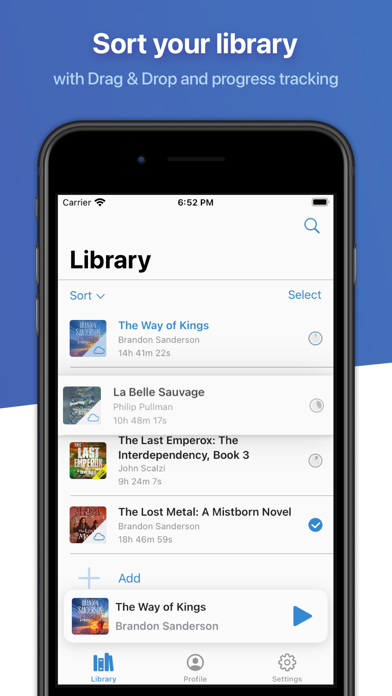
– Maintain and see progress of your books
– Mark books as finished
– Drag & Drop to sort your library
– Create playlists
– Automatically play items in turn
– Play the first unfinished file by tapping on the playlist artwork
– Move files to playlists from the library or import them directly
– Edit your book details (title, author, artwork)
– Connect to your Hardcover.app account, and track your library progress
Listen
– Control audio playback from the lock screen, control center or from the companion app on the Apple Watch
– Play and navigate books with Chapters
– Jump to start of the current book
– Change playback speed
– Smart rewind
– Volume Boost
– Support for remote events from headset buttons and the lock screen
– Sleep timer with adjustable duration
– CarPlay support
– VoiceOver support
– Dolby Atmos support
– Dark mode for night owls
– Continue listening across your devices with Cloud Sync, including stand alone playback on your Apple Watch
Supported
M4B/M4A/MP3
BookPlayer is licensed under GNU General Public License v3.0. The source code and a list of all its contributors can be found on the GitHub page of this project at www.github.com/TortugaPower/BookPlayer
You can see our Privacy policy and terms of use in the following links:
– https://github.com/TortugaPower/BookPlayer/blob/main/PRIVACY_POLICY.md
– https://github.com/TortugaPower/BookPlayer/blob/main/TERMS_CONDITIONS.md
For help and ways to contribute to the project see the support section in the Settings screen of BookPlayer or visit www.bookplayer.app
If you enjoy BookPlayer, we would be glad if you consider writing a review.
Quoi de neuf dans la dernière version ?
Improvements
– You can now reload the parsed chapters in a file, in case there are some missing from the native parser
– Add new settings to show the player on launch for both the main app and CarPlay
Bugfixes
– Fix crash when displaying the library with percentages in numbers instead of the pie chart
– Fix queued tasks not clearing up when signing out
– Add file validations to downloads to avoid truncated files on the Watch app
Special thanks to:
– @klikh (sponsor)
If you experience any issues, please reach us at support@bookplayer.app