TorSculpt
iPad / Graphisme et design
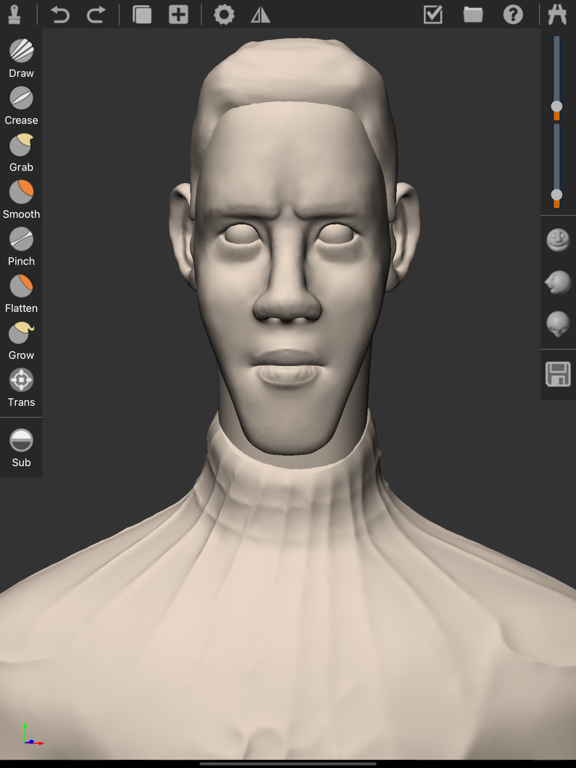
TorSculpt is a 3D sculpting and modeling application. It's easy to use, especially for 3D sculpt beginners. You can draw 3d models with Apple pencil and use gestures to translate rotate and scale models. This App is only for iPad and use Apple Pencil to draw so you need to prepare an Apple Pencil before you use it.
TorSculpt includes lots of 3d sculpting functions below.
Draw mode
You can Draw subdivision meshes on model and also use add or subtract effect on the draw mode.
Crease mode
Use crease mode you can easily sculpt character's mouth and eyes or any other model's part that include crease effect. you can use the add and subtract effect while using this mode.
Smooth mode
Smooth mode is very often to be used while you sculpting any models, it's usually used together with Draw or crease model.
Grab mode
Use Grab mode you can change the model like grab on surface, this mode only change the vertex and triangles position and not add any subdivide surface.
Pinch Mode
Pinch mode can make the vertex of the model surface more sharp, some times you can use this functions to push out the model's surface looks more clear.
Flatten mode
Flatten mode means using this effect will make the model's surface flatten.
Grow mode
Grow mode is different than Grab mode. You know grab mode only change the position of the vertexes, but the Grow mode also subdivide the surface. So you can use this mode to make the model grow something like grow a tail.
Trans mode
Trans mode means you can change the model's position and rotation and scale when you sculpting a model. This mode is so important for sculpting because 3D scene include lots of objects and different object has different position and rotation and scale.
Radius and Strength
When you sculpting 3d model you can use any sculpt mode above and you can also change the sculpting radius and strength of each mode.
Front Right Top view
This is so friendly functions for 3d sculpting and it will make your sculpting more accuracy because you can easily change the view to the front and right and top view directly.
Load Save project
Don't forget to save your project while you sculpt any model. You can load any project you saved and re-sculpt it any time. your project will save to standard obj format and you can use this format in any other 3d software.
Objects manage
You can add or delete any object in your project use Objects manage function. You can also duplicate and mask and mirror object in this panel.
Undo Redo
If you do some changes and you do not want that change you can use this function so that you can easily recover the status you want.
Quoi de neuf dans la dernière version ?
Recompile this App and fix some crash bugs.