Stereonet Mobile
iOS Universel / Education
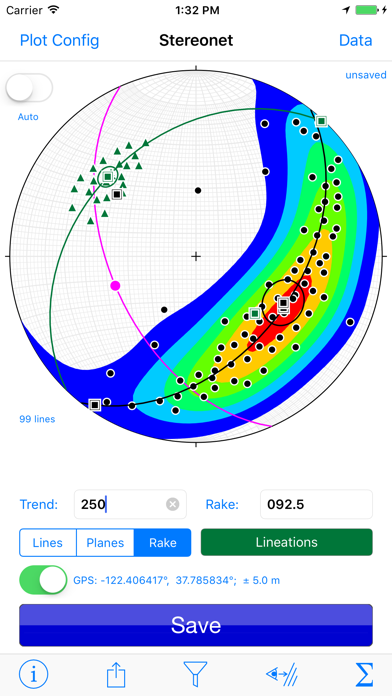
Stereonet Mobile is designed to help you collect, visualize, and analyze geological orientation data. It is a companion to my Stereonet program for desktop computers. As such I have tried to incorporate the basic functionality of that program, taking into account the inherent limitations of mobile devices. Some of the basic tasks that one can perform with Stereonet Mobile include:
• Provide automatic data entry as a geologist's compass by reading the iOS device orientation and converting it to strike and dip of planes and/or trend and plunge of lines. It is the only geology compass app that can use augmented reality to record the strike and dip of planes using the sighting method and the device camera.
• Provide manual data entry via either tapping and dragging on the stereonet or by typing values into text fields
• Plot lines and planes, which can be tagged using one of as many user defined data types (e.g., bedding, cleavage, slickensides, etc.) as you want
• Carry out basic calculations such as: rotations about any axis, planes from poles or poles from planes, measure angles between lines and between planes, and basic slope stability calculations
• Plot mean vectors, cylindrical best fits, rose diagrams, and contour lines.
• View the plots from any orientation, not just looking straight down into the lower hemisphere
• See the location of a datum on a map or satellite image (if you have an internet connection)
• Show realtime changes to the stereonet projection to help students understand the geometry of the device better
• Provide basic input and output of data using standard iOS conventions
• Works on iPhones or iPads. The program will work on iPods or iPads lacking a cellular data connection but those devices have fewer sensors and thus cannot be used in automatic data collection mode.
Quoi de neuf dans la dernière version ?
v. 4.5.1 -- 24 April 2026
• FIXED -- The previous version inadvertently broke the auto-measuring of a plane and of lines in the plane using the rake function. This bug has been fixed in this version.
v. 4.5.0 -- 20 April 2026 (It's been a while!)
• NEW -- Stereonet Mobile now can account for camera bumps/plateaus and other non-planar elements on the back side of your phone when measuring a strike and dip by placing the back of the phone flush against the plane to be measured. There is a new calibration feature, accessible from the Settings Screen (gear icon) , "Correction for Camera Bump" that enables the app to figure out exactly what the correction factor should be for your phone and case. The calibration take maybe a minute and, once set will be applied to all new measurements, even after switching projects.
• NEW -- The Edit Type screen now uses the standard iOS color picker to select colors rather than the RGBA sliders in previous versions.
• IMPROVED --- The app now uses the new Apple design language throughout if you are on iOS or iPad OS 26. Rose diagrams now include all data sets. There have also been numerous interface tweaks and fine tuning. The users manual, accessible from the Settings Screen, has been updated.
• FIXED -- some minor bugs that would cause a line on plane (i.e., rake) not to function properly under certain circumstances.