iPhoneAddict Apps
  • Actualités
  • Accueil Apps
  • iPhone
  • iPad
  • Universelles
  • Mac
  • Apple TV
KG KultureGeek
App
iPhone / iPad Télécharger iAddict v5 Mac Télécharger iAddict Mac
  • Actualités
  • Accueil Apps
  • iPhone
  • iPad
  • Universelles
  • Mac
  • Apple TV
  • Archives keynotes
  • Firmwares & iTunes
  • Contactez-nous
  • Comparateur de prix
  • KultureGeek
Accueil » Liste des Apps » Apps iPhone » Education » RST SEALx
1.2.1 iOS €0,99€ koji kamogawa 0 0 This app is a CW QSO Trainer App for CW beginner of Ham Radio. You can select various information from CALL, RST, Name, QTH, Rig/Ant and Age/WX by random. This allows you to experience the actual QSO communication content in a simulated manner. ...
RST SEALx

RST SEALx

iPhone / Education

0,99€
Acheter sur l'App Store
Facebook X E-mail

This app is a CW QSO Trainer App for CW beginner of Ham Radio.
You can select various information from CALL, RST, Name, QTH, Rig/Ant and Age/WX by random.
This allows you to experience the actual QSO communication content in a simulated manner.

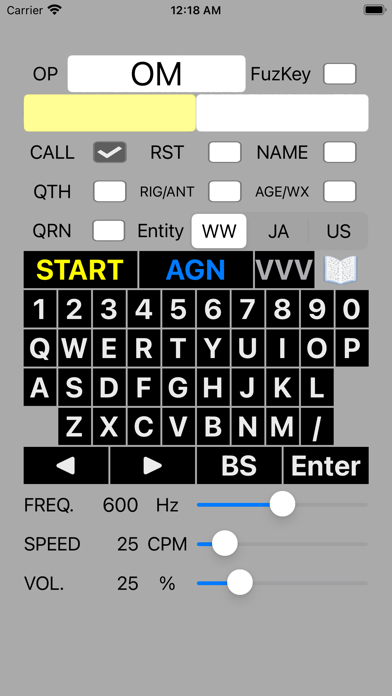
Default OP Name is "OM", please touch/input your Name by software keyboard.
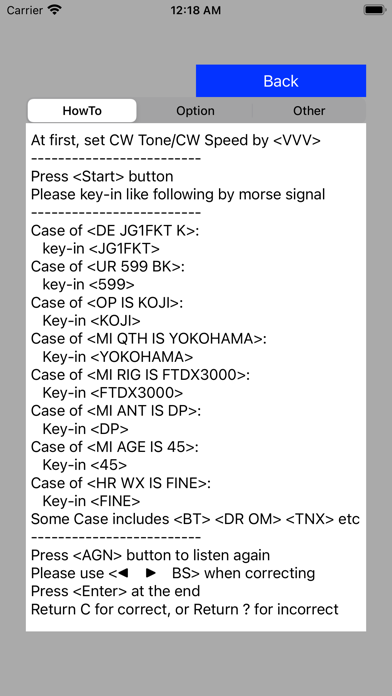
Start with the "START" button.
Repeat the previous with the "AGAIN" button.
Check the FREQ SPEED and VOL the "VVV" button.

[CheckBox]
CALL:
You will hear a Callsign, enter the callsign and press Enter.
RST:
You will hear the RST Report, enter the Report and press Enter.
NAME:
You will hear the OP Name, enter the Name and press Enter.
QTH:
You will hear the QTH of OP, enter the QTH and press Enter.
RIG/ANT:
You will hear the Rig or Antenna of OP, enter the Rig/Antenna and press Enter.
AGE/WX:
You will hear the Age or WX(Weather) of OP, enter the Age/WX and press Enter.
QRN:
GRN is ON/OFF of the background Signal Noise.
Entity:
You can choose W/W, JA or US.
FuzKey:
Fuzzy Keying like a Straight Key.

[Slider]
FREQ.:
You can choose the tone of CW.
SPEED:
You can choose the speed of CW.
VOL.:
You can choose the sound level of CW.

[Demo Video URL]
https://youtu.be/fcRPz94sga8

Supported keyboard input from Apple Silicon Mac.
[Support Key]
A-Z, 0-9, /
Enter:return
BS:delete
START:UpArrow
AGN:DownArrow
LEFT:LeftArrow
RIGHT:RightArrow
En voir plus...

Quoi de neuf dans la dernière version ?

Supported keyboard input from Apple Silicon Mac. (Not compatible with iOS)
[Support Key]
A-Z, 0-9, /
Enter:return
BS:delete
START:UpArrow
AGN:DownArrow
LEFT:LeftArrow
RIGHT:RightArrow
  • Screenshot #1 pour RST SEALx
  • Screenshot #2 pour RST SEALx
  • Screenshot #3 pour RST SEALx

D'autres applications du développeur

UkeDrumUkeDrumiPhoneRST 599 ProRST 599 ProiPhoneRST 599xRST 599xiPhoneRST 599TK ProRST 599TK ProiPhoneRST Decoder ProRST Decoder ProiPhoneRST 599xpRST 599xpiPadVoir toutes les apps

Note

(0 note)

Détails sur l'application

Version
1.2.1
Taille
13.7 Mo
Version minimum d'iOS
12.0
Dernière mise à jour
22/01/2024
Publié par
koji kamogawa

Newsletter App Store

Recevez chaque jour les meilleures promos

Actualité Apple

Image Les États-Unis ne veulent pas qu’Apple achète de la RAM chinoise
Les États-Unis ne veulent pas qu’Apple achète de la RAM chinoise
Image Apple retire sa pub polémique avec un enfant et un iPhone en Italie
Apple retire sa pub polémique avec un enfant et un iPhone en Italie
Image L’iPhone Ultra pliable va-t-il résoudre les défauts du Galaxy Z Fold 8 ?
L’iPhone Ultra pliable va-t-il résoudre les défauts du Galaxy Z Fold 8 ?
Image Mac : des hackers exploitent la faille du partage d’écran avec un mineur de cryptomonnaie
Mac : des hackers exploitent la faille du partage d’écran avec un mineur de cryptomonnaie
iPhoneAddict Apps

Le catalogue iPhoneAddict pour suivre les nouveautés, mises à jour et baisses de prix de l’App Store.

Apps

Toutes les apps iOS iPhone iPad Universelles Mac Apple TV

iPhoneAddict

Actualité Apple Archives keynotes Contact À propos KultureGeek

Suivez-nous

©2009-2026 i2CMedia. Tous droits réservés.