AVer Control Panel
iOS Universel / Education
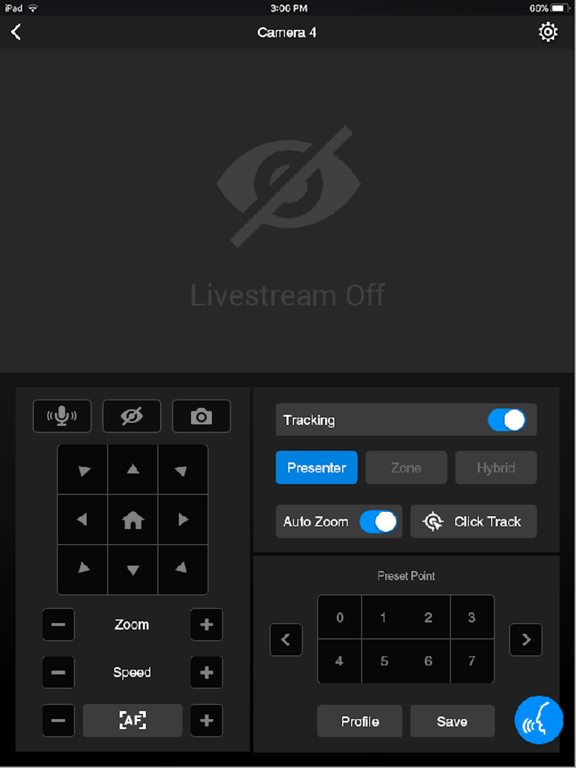
AVer Control Panel puts you in charge of PTZ camera and MT box controls in an easy user interface within your internal network. It gives you access to live video and audio streams from AVer Pro AV, DL Series cameras and MT boxes on an iPad or iPhone, and it allows you to control the camera’s capture, PTZ functions and MT box profiles, even enables voice command which provides hands-free experience. You can also enable or disable tracking features like Presenter, Zone, or Hybrid mode, store and call up to 256 presets. With the AVer Control Panel, there’s no need for complicated controllers, heavy software applications, or professional AV operators to run your AVer PTZ cameras and MT boxes.
Product Features
- Instantly find and connect to available AVer Professional Auto Tracking and PTZ Cameras.
- Voice control supported, control your AVer cameras handsfree.
- Currently supports only one camera connection at a time.
PTZ and Tracking Controls
- Capture camera images and save them to the device album.
- Pan, tilt, and zoom your camera to capture different areas of your room.
- Adjust the pan/tilt speed, and switch between autofocus and manual focus.
- Enable and disable tracking features, including Presenter/Zone/Hybrid Mode, and Click Track.
- Save and call up to 256 preset points.
Compatibility
- Requires iOS & iPadOS® 9 and later. Compatible with iPad® and iPhone®.
Supported Camera Models
-USA
TR310/TR311/TR311HN/TR313/TR331/TR333 0.0.0000.21 and later
TR530/TR320/TR530+/TR320+ 0.0.1000.47 and later
PTZ310/PTZ310N/PTZ330/PTZ330N 0.0.0000.56 and later
DL30 7.0.0010.13 and later
TR313V2/TR323V2/TR313V2/TR333V2/TR311HWV2 0.1.0000.19 and later
PTZ211/PTZ231/PTZ310UV2/PTZ310UNV2/PTZ330UV2/ PTZ330UNV2 0.0.0000.15 and later
MD330 series 1.1.1006.0 and later
MD120U 1.1.1003.0 and later
TR211/TR315/TR315N/TR335/TR335N 0.0.0000.12 and later
MT100(S) 0.1.0000.63 and later
MT300(N) 0.0.0000.11 and later
TR535 0.0.0000.18 or later
TR615 0.0.0000.21 and later
TR322 0.0.0000.06 or later
-Non USA
PTC310/PTC310U/PTC310H/PTC310N/PTC310UN/PTC310HN 0.0.0000.21 and later
PTC330/PTC330N/PTC330U 0.0.0000.21 and later
PTC115/PTC500S/PTC115+/PTC500+ 0.0.1000.47 and later
PTZ310/PTZ310N/PTZ330/PTZ330N 0.0.0000.56 and later
PTZ211/PTZ231/PTZ310UV2/PTZ310UNV2/PTZ330UV2/ PTZ330UNV2 0.0.0000.15 and later
PTC310UV2/PTC310UNV2/PTC320UNV2/PTC330UV2/PTC330UNV2 0.1.0000.19 and later
DL30 7.0.0010.13 and later
DL10 7.0.0031.32 and later
MD330 series 1.1.1006.0 and later
MD120U 1.1.1003.0 and later
TR211/TR315/TR315N/TR335/TR335N 0.0.0000.12 and later
MT100(S) 0.1.0000.63 and later
MT300(N) 0.0.0000.11 and later
TR535 0.0.0000.18 or later
TR615 0.0.0000.21 and late
TR322 0.0.0000.06 or later
Visit websites below to get assistance or find user manual:
- Global
Download Center: https://www.aver.com/download-center
Technical Support: https://www.aver.com/technical-support
- USA
Download Center: https://www.averusa.com/pro-av/support/
Technical Support: https://averusa.force.com/support/s/contactsupport
- European Headquarters
Download Center: https://www.aver.com/download-center
Technical Support: https://www.avereurope.com/technical-support
Quoi de neuf dans la dernière version ?
- Added support for TR322.
- Added support for Framing mode and AI Patrol.
- Improved Tracking UI state display and synchronization with web settings.
- Improved Click Track responsiveness and status display.
- Improved Profile and Tracking availability detection for supported camera models.
- Added a prompt when Click to Center or Click to Track is unavailable in PIP/PBP modes.