Making Change USD
iPad / Education
This program teaches the student about changing (converting) larger denominations of currency into smaller ones, such as breaking a dollar bill into four quarters or ten dimes or any other collections of coins that add up to the dollar.
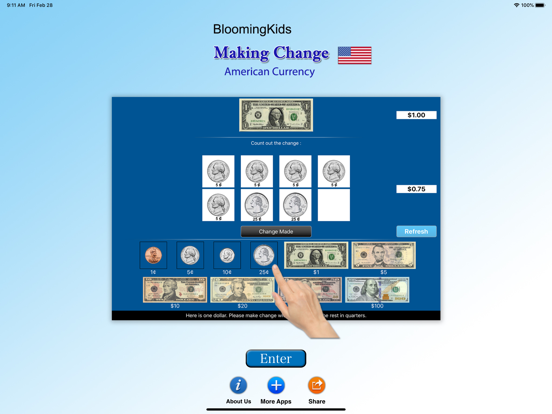
The screen has a top box showing the coin or bill for which change is needed. To the right of the top box is a counter giving the value of the currency in the top box.
Under the top box are more boxes in the middle of the screen with spaces for the coins or bills that the student is using to make change for the money in the top box. To the right of the middle boxes is a counter giving the value of the change in the middle boxes.
At the bottom is another set of boxes with a coin or bill in each box. The student clicks on these coins or bills to make change for the coin or bill in the top box.
Change Made
The student clicks this button when he/she thinks the correct change has been placed in the boxes in the middle.
Settings
Mode
Test
Select this option to measure the student’s progress. The “Report” button under “Test” mode is enabled.
Report
This displays results of the “Test”. The report Holds Only 20 Records.
Grade On/Off: If it is on, app will monitor correct and wrong responses by the student
Correct Answer: When a student response to a question with correct answer
Wrong Answer: When a student response to a question with wrong answer
Number of Total Attempt: Number of times a student tried to answer questions in the app.
Bar Chart: Represents the student's performance graphically.
View Records: If there are old test results, they will be shown on this screen. The current test result is always on top.
Print: This will print the grade or data on the screen.
Clear Data: This button erase all the data that was stored and free up the memory that data was occupying.
Display the Value of the Coins or Bills is on
This is the default setting. The value of the coin or bill (such as "10¢" under a dime) appears under the coin or bill.
Display the Value of the Coins or Bills is off
The value of the coin or bill (such as "10¢" under a dime) will not appear under the coin or bill.
Command Text
This option is selected by default. When this is checked, text appears at the bottom of the screen instructing the student to (for instance) “Here is five dollars. Please make change with 4 one-dollar bills and the rest in quarters.” If not checked, the command text does not appear.
Congratulatory Animation
This is selected by default. When the student makes the correct change and clicks on the "Change Made" button, there will be a congratulatory animation. Click anywhere on the screen or press the space bar to stop the congratulatory animation. When not checked, the animation will not appear.
Selection
Here the teacher/therapist can select the coins and/or bills that the student can use to make change. By default "Select All" is checked.
Select All
This selects all coins and bills.
Quoi de neuf dans la dernière version ?
The current app version updated with the new age rating.