I Click I Talk Compact
iPad / Education
I Click I Talk has several unique and critical features that are missing from competing augmentative and alternative communication AAC systems. For example:
Layout and image size options:
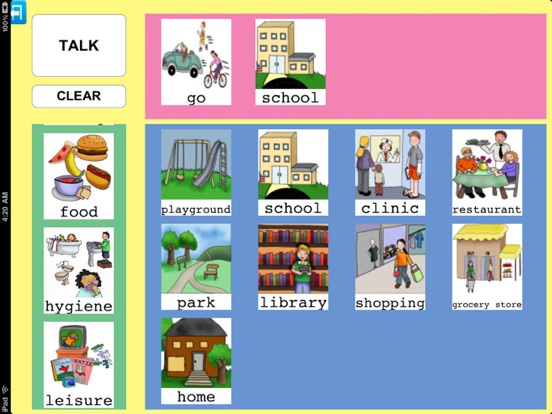
Teachers and parents have the ability to choose from several layout and image size options. This feature helps children who are non verbal or verbal and adults with stroke and traumatic brain injuries to use the visual layout that best fits their needs. Also people who are visually impaired can benefit from the larger image size.
Text image options:
Teachers and parents have the ability to create images that contain only text. This feature helps with the development of language. Teachers and parents can start by showing images, then they can introduce the text below the image and finally remove the picture and display only text. Adults with stroke and traumatic brain injuries can use text only images.
Place holder and text image options:
The place holders distance images from one another.
Record voice:
Although I Click I Talk comes with 70 preloaded images with audio files, teachers and parents can still record their own voices. This feature allows non-English speaking children to use I Click I Talk.
Write text:
Teachers and parents can input text below any image. Similar to the feature above, being able to write text in different languages allows everybody to use I Click I Talk.
Import personal images/photos:
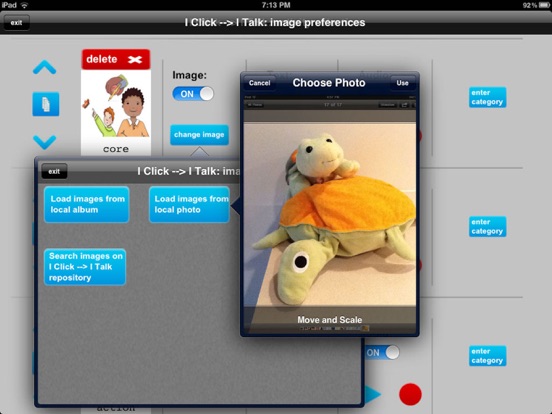
Teachers and parents can import their own images/photos or replace preloaded images using those with which the child is already familiar. I Click I Talk also provides free access to an on line repository of over 1000 cartoon-like images even in black and white.
I Click I Talk was created as collaboration between a computer scientist and a speech and language pathologist. They used a rigorous research approach during the design and the development of I Click I Talk.
I Click I Talk COMPACT allows you to show a maximum of 4 categories and 8 pictures for each category. Want more activities? More pictures? More capabilities? Need data? Take a look at the other versions of I Click I Talk:
-) SINGLE STUDENT (for iPad)
-) MULTI STUDENT (for iPad)
Categories: Special Needs
Quoi de neuf dans la dernière version ?
This update from Apple will improve the functionality of this app. No new features are included.
Now compatible with IOS 11