EquationPro
iOS Universel / Education
Welcome to EquationPro – Your Ultimate Equation Plotting Tool!
EquationPro is designed to simplify the process of plotting and analyzing mathematical equations. Whether you're a student, educator, or math enthusiast, our app provides a powerful and intuitive platform for visualizing equations in real-time. Here’s a guide to help you make the most out of EquationPro:
Equation Input:
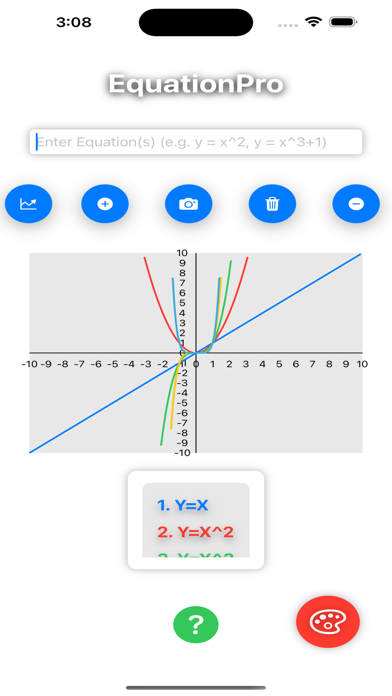
Text Field: Enter your equations in the text field provided. You can input multiple equations separated by commas (e.g., y = x^2, y = sin(x)). The app supports various mathematical functions, including trigonometric, polynomial, and exponential functions. Once entered, tap the 'Plot' button to generate the graphs.
Plotting Equations:
Camera Usage:
Users can utilize the camera to scan and read mathematical equations, which will then be plotted directly in the Equation Pro App. This an optional feature if user wants to scan or read the required equation from book or handwriting on paper or from computer monitor.
Plot Button: After entering your equation(s), tap the 'Plot' button (chart icon) to visualize the graph. The app automatically plots the equation(s) on the graph using different colors for each curve, making it easy to distinguish between multiple functions.
Interactive Features:
Add Equation: Quickly add new equations to your graph by tapping the 'Add' button (plus icon). This button re-focuses the text field, allowing you to continue adding more equations without leaving the screen.
Clear Plots: Want to start fresh? Tap the 'Trash' button (trash icon) to clear all plotted equations and graphs from the screen.
Delete Last Equation: Made a mistake? Tap the 'Minus' button (minus icon) to remove the last equation you plotted, along with its corresponding graph.
Graph Customization:
Color Palette: Personalize your plotting experience by changing the background color of the graph. Tap the 'Palette' button (paint palette icon) in the bottom-right corner to cycle through various background colors, enhancing visibility and making the graph more visually appealing.
Equation List:
Scrollable View: All plotted equations are listed below the graph in a scrollable window. Each equation is numbered and color-coded to match its corresponding plot. This makes it easy to identify and reference specific equations.
Copy Equations:
Copy Button: Located at the bottom left, this button allows you to copy the entire list of plotted equations to your clipboard. This feature is especially useful for sharing equations or saving your work for later use.
Help and Guidance:
Help Button: Need assistance? Tap the 'Help' button (question mark icon) at the bottom to view this help guide anytime. This button also provides audio feedback for an interactive experience.
EquationPro combines powerful features with a user-friendly interface to help you explore and understand mathematical equations effortlessly. Whether you're plotting simple functions or complex expressions, EquationPro is your go-to tool for clear, accurate visualizations. Happy plotting!