TrialPad - Trial Presentation
iPhone / Economie et entreprise
TrialPad is a full-featured courtroom presentation tool that allows lawyers and support staff to organize and present documents, photographs, video and audio files, and demonstrative evidence wirelessly in a courtroom or remote setting. Callout and highlight sections of documents, compare documents side by side, edit and show video clips, add exhibit stickers to documents, search document text, and much more.
TrialPad can integrate with your Windows workflow, is powerful, easy to use, and a fraction of the cost of traditional or cloud based programs, all while being secure, private, mobile, and efficient.
LIT SOFTWARE has set the bar for developing the best in litigation apps, garnering awards for innovation and ease of use. Our apps have been featured by Apple, and are loved by lawyers.
—— LIT SUITE REVIEWS ——
“The short review. Wow.”
“TrialPad offers a full trial presentation system in a simple-to-use package at a fraction of the cost.”
“These are incredibly sophisticated and useful apps that are in many ways more powerful than PC software costing hundreds of dollars more.”
“For anybody doing any amount of trial work...TrialPad is a must have application.”
“TrialPad is the perfect case organizer and presenter.”
“TrialPad is one of the most complete and high tech presentation systems designed for lawyers and it is available right on your iPad [and Mac].”
“TrialPad...is the industry leader.”
—— QUICK FEATURE SUMMARY ——
• Full electronic courtroom presentation capability, no cloud connection needed
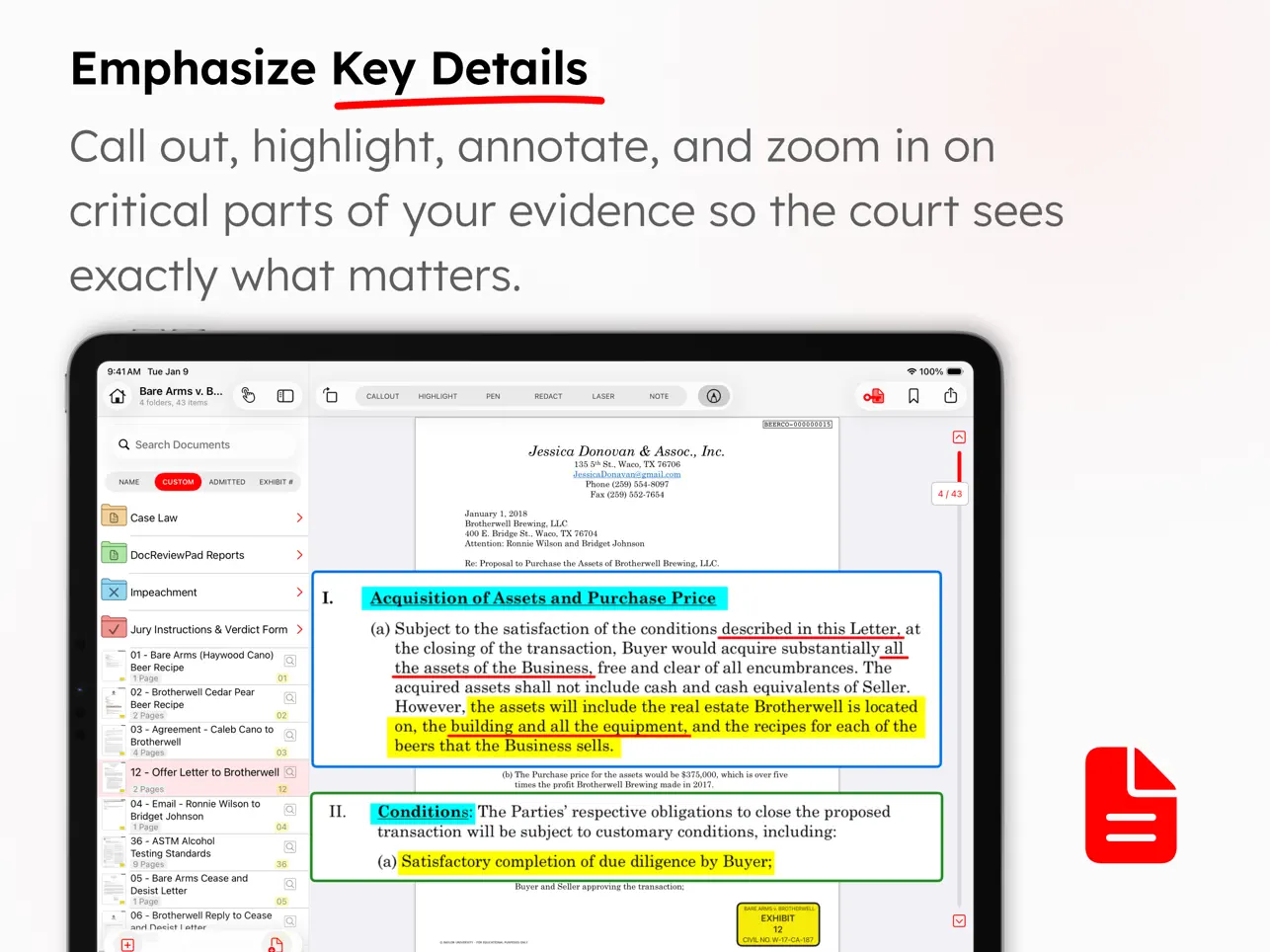
• Create callouts from documents, photographs, or transcripts
• Highlight, annotate, redact, and zoom in on your evidence
• Import documents directly from an email, USB drive, or cloud storage providers like Box, Citrix Files, Dropbox, Google Drive, Microsoft OneDrive, and many more
• Present via HDMI to a TV or projector, or present wirelessly using an Apple TV
• Add whiteboards and smoothly write or draw with Apple Pencil
• Add bookmarks in long documents to jump to specific pages
• Create presenter notes to help with your direct examination
• Make key docs of pages from important documents with saved annotations
• Search for a file name, or text within one document, a folder of documents, or the whole case
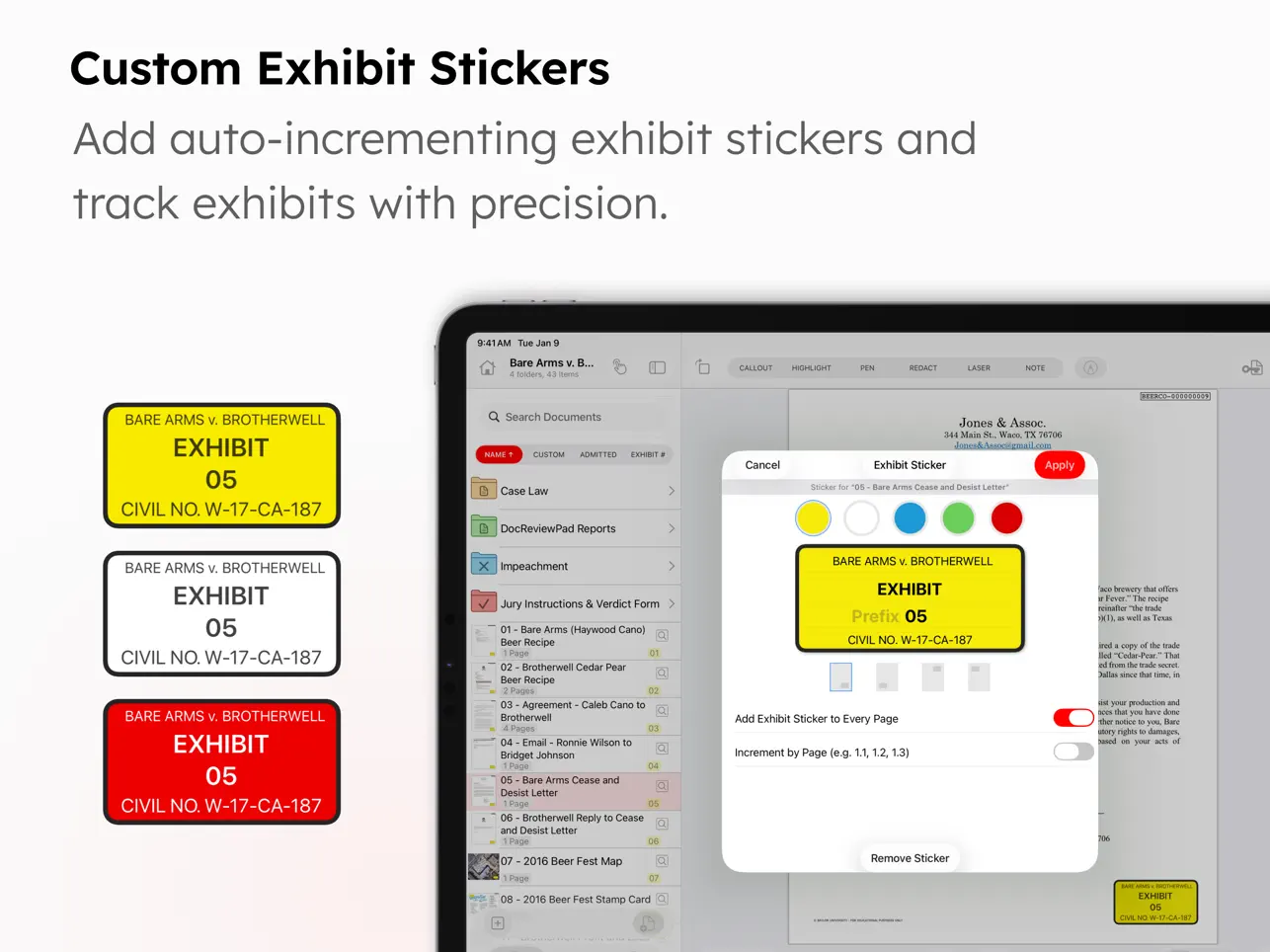
• Add exhibit stickers to documents, with the ability to automatically increment numbers or letters
• Mark documents as admitted so you know what can be presented without question
• Create reports of all your evidence, presenter notes, or a presentation log with a date and time stamp
• Edit video clips, or take snapshots of frames of video
• Take snapshots of annotated documents with callouts to incorporate into motions
• Organize your evidence into witness or issue folders
• Add map images directly from Apple Maps
• Import PDF files with bookmarks and retain those bookmarks in TrialPad
• Import organized production sets from DocReviewPad
• Import synced video depositions, reports, and impeachment slides from TranscriptPad
• Share entire case files with other users using cloud storage or a USB drive
• File formats supported: PDF, JPG, PNG, TIF, TXT, video and audio
• Available for iPad and Mac
—— EASILY ORGANIZE AND PRESENT EVIDENCE ——
Easily import files from many cloud storage providers, from a USB drive, drag-and-drop, even AirDrop. Then plug-and-play via HDMI to present to a projector or TV, or present wirelessly using an Apple TV.
Pre-annotate and organize evidence into witness or issue folders. Add exhibit stickers, and mark documents as admitted. Create highlights and annotations on-the-fly, zoom in on important areas, create multiple callouts on-the-fly, or compare two documents side-by-side.
LIT SUITE SUBSCRIPTION
One subscription gives you access to all LIT SUITE apps on iPhone, iPad, and Mac. After your 7-day free trial, your App Store account will be charged and your subscription will renew automatically unless canceled in advance. Manage your subscription in your App Store account settings.
Quoi de neuf dans la dernière version ?
• NEW / IMPROVED
– Improved callout editing and undo behavior when using Presenter Notes, ensuring callouts remain responsive and can be removed individually.
– Added the in-app volume control in the multimedia player, making it easier to adjust audio playback during video review and presentations.
– Improved Exhibit Sticker assignment feedback so that alerts about skipped numbers remain visible until dismissed, making it easier to review bulk assignment results.
– Ongoing performance and usability improvements.
• FIXED
– Fixed an issue in bulk Exhibit Sticker assignment where the first document could receive a duplicate number, ensuring numbering correctly skips already-used values from the start.
– Restored the download progress indicator when downloading the Bare Arms sample case, providing clearer feedback while the download is in progress.
– Fixed an issue where the Share and Bookmark buttons could disappear after sharing a document via email, ensuring both toolbar actions remain available.
– Additional bug fixes and stability improvements.
Please let us know if you encounter an issue or have other feedback. We value your feedback as it helps us address issues, refine features, and update documentation.
– Visit our Help Center: https://support.litsoftware.com
– Email Support: support@litsoftware.com
– Learn Online with LIT SUITE Academy: https://learn.litsoftware.com