iPhoneAddict Apps
  • Actualités
  • Accueil Apps
  • iPhone
  • iPad
  • Universelles
  • Mac
  • Apple TV
KG KultureGeek
App
iPhone / iPad Télécharger iAddict v5 Mac Télécharger iAddict Mac
  • Actualités
  • Accueil Apps
  • iPhone
  • iPad
  • Universelles
  • Mac
  • Apple TV
  • Archives keynotes
  • Firmwares & iTunes
  • Contactez-nous
  • Comparateur de prix
  • KultureGeek
Accueil » Liste des Apps » Apps Universelles » Economie et entreprise » EVA ROP
3.0.4 iOS €Gratuit PANASONIC ENTERTAINMENT & COMMUNICATION CO., LTD. 0 0 ・ Name of App EVA ROP (EVA Remote Operation Panel) ・ Description EVA ROP is a control program that enables the wireless remote control of the "AU-EVA1" camera. It provides a GUI that displays status information, settings and user switch...
EVA ROP

EVA ROP

iOS Universel / Economie et entreprise

Gratuit
Obtenir sur l'App Store
Facebook X E-mail

・ Name of App
EVA ROP (EVA Remote Operation Panel)

・ Description
EVA ROP is a control program that enables the wireless remote control of the "AU-EVA1" camera.
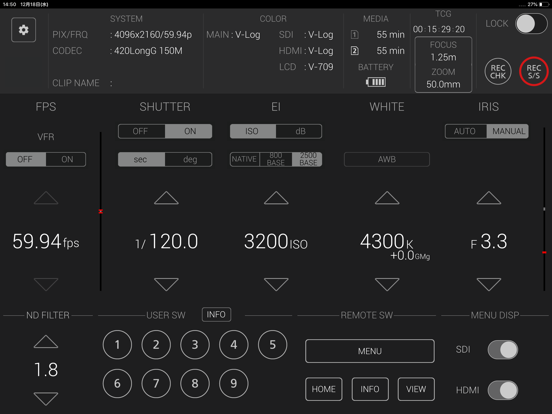
It provides a GUI that displays status information, settings and user switch status in a single screen and the ability to change camera settings intuitively using a screen touch.
Buttons such as user buttons and REC S/S button in screen can manipulate AU-EVA1.
Please refer to the EVA ROP application manual for connection and usage.

* Note:
For wireless LAN connection with the camera, a wireless module needs to be purchased separately.
Refer to the web page for the wireless module.


・ Applicable Model
AU-EVA1


・ Supported OS
iOS 12 or later

・ Features
1. Camera status display
- System mode and color settings
- Remaining time of recording media
- Battery remaining time
- TCG(Time Code)
- Zoom value
- FOCUS(m/ft toggle switch)

2. Status display and settings for the following items
- FPS
- SHUTTER
- EI
- WHITE BALANCE
- IRIS
- ND FILTER

3. Record Control
REC S/S button in screen allows Rec start and stop.

4. USER SWITCH CONTROL
Each of Nine User buttons in screen can perform function assigned to its corresponding user button in connected AU-EVA1

5. Switching Control in Camera LCD status display
MENU, HOME, INFO or VIEW button in screen can switch Camera LCD display to the corresponding screen.
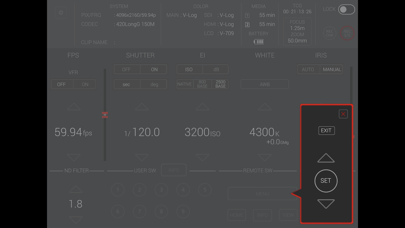
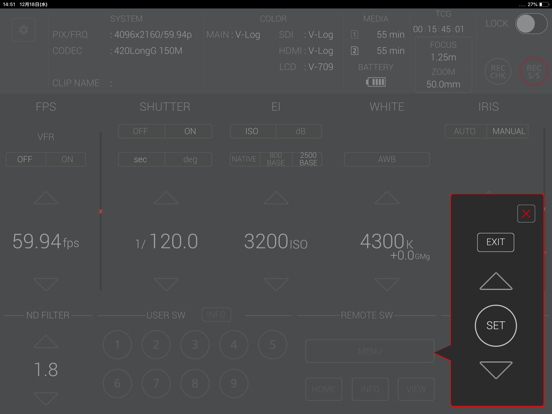
Menu operation panel which shows up by MENU button can manipulate menus in connected AU-EVA1

6. MENU DISPLAY Control
SDI or HDMI button in screen can toggle its corresponding output signal flow

7. Control for ZOOM and FOCUS
Zoom and FOCUS can be controlled in the ZOOM/FOCUS control panel.
Also, the m/ft switch can change display units of FOCUS.

[NOTE]
In iOS 11, camera information may not be displayed correctly on the app screen.
This can be fixed by turning on airplane mode and then turning off again.

・SETTINGS
1. Close "EVA ROP".
2. Select "Settings" on the device home screen
3. Turn on "Airplane mode"
4. Turn off "Airplane mode"
5. Launch "EVA ROP"

*These settings need to be repeated after turning off or restarting the device.

En voir plus...

Quoi de neuf dans la dernière version ?

- Supported OS is now iOS12 or later.
- Fixed a bug with ZOOM/FOCUS control.

  • Screenshot #1 pour EVA ROP
  • Screenshot #2 pour EVA ROP
  • Screenshot #3 pour EVA ROP
  • Screenshot #4 pour EVA ROP
  • Screenshot #5 pour EVA ROP
  • Screenshot #6 pour EVA ROP

D'autres applications du développeur

Panasonic Stereo Remote 2012Panasonic Stereo Remote 2012iPhonePanasonic Theater Remote 2012Panasonic Theater Remote 2012iOS UniverselPanasonic TV Remote 2Panasonic TV Remote 2iOS UniverselPanasonic Music StreamingPanasonic Music StreamingiOS UniverselPanasonic Stereo System Network SetupPanasonic Stereo System Network SetupiPhoneStereo System Network SetupStereo System Network SetupmacOSVoir toutes les apps

Note

(0 note)

Détails sur l'application

Version
3.0.4
Taille
29.9 Mo
Version minimum d'iOS
12.0
Dernière mise à jour
25/04/2024
Publié par
PANASONIC ENTERTAINMENT & COMMUNICATION CO., LTD.

Newsletter App Store

Recevez chaque jour les meilleures promos

Actualité Apple

Image iOS 27 tease davantage d’IA avec un abonnement iCloud+ plus cher
iOS 27 tease davantage d’IA avec un abonnement iCloud+ plus cher
Image Après le football et la F1, Apple TV veut diffuser du golf
Après le football et la F1, Apple TV veut diffuser du golf
Image iPhone pliable : « tout le monde » chez Apple l’appelle iPhone Ultra
iPhone pliable : « tout le monde » chez Apple l’appelle iPhone Ultra
Image iOS 27 : nouvelle bêta publique pour le firmware des AirPods
iOS 27 : nouvelle bêta publique pour le firmware des AirPods
iPhoneAddict Apps

Le catalogue iPhoneAddict pour suivre les nouveautés, mises à jour et baisses de prix de l’App Store.

Apps

Toutes les apps iOS iPhone iPad Universelles Mac Apple TV

iPhoneAddict

Actualité Apple Archives keynotes Contact À propos KultureGeek

Suivez-nous

©2009-2026 i2CMedia. Tous droits réservés.