iPhoneAddict Apps
  • Actualités
  • Accueil Apps
  • iPhone
  • iPad
  • Universelles
  • Mac
  • Apple TV
KG KultureGeek
App
iPhone / iPad Télécharger iAddict v5 Mac Télécharger iAddict Mac
  • Actualités
  • Accueil Apps
  • iPhone
  • iPad
  • Universelles
  • Mac
  • Apple TV
  • Archives keynotes
  • Firmwares & iTunes
  • Contactez-nous
  • Comparateur de prix
  • KultureGeek
Accueil » Liste des Apps » Apps iPhone » Divertissement » Mandelbulb Raytracer
2.01 iOS €0,99€ Angisoft 2.3 3 Be a virtual sculptor and create your own personal art in just seconds. Then use it as a background image to impress your friends. Play with the parameters to create an unlimited number of exciting 3D shapes. You can make the sculpture shiny by...
Mandelbulb Raytracer

Mandelbulb Raytracer

iPhone / Divertissement

0,99€ au lieu de 1,19€
Acheter sur l'App Store
Facebook X E-mail

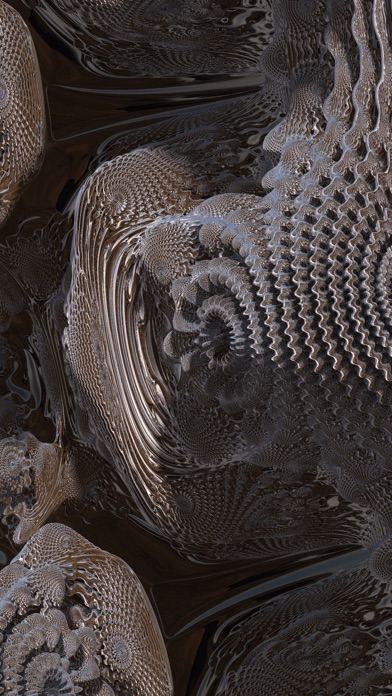
Be a virtual sculptor and create your own personal art in just seconds. Then use it as a background image to impress your friends. Play with the parameters to create an unlimited number of exciting 3D shapes. You can make the sculpture shiny by selecting an environment that will be reflected on the object.

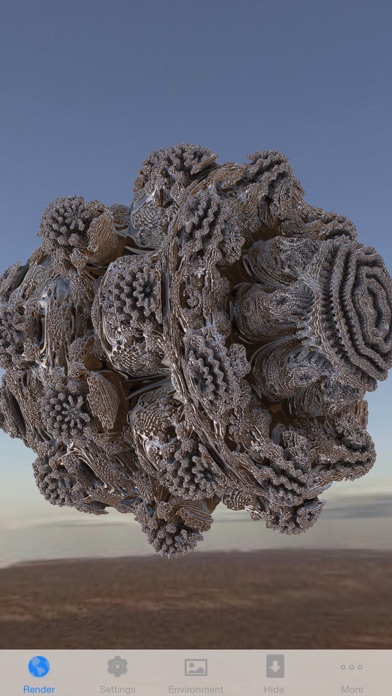
Mandelbulb Raytracer is another exciting real-time ray tracer from Angisoft for the iPhone 3GS and iPhone 4. It renders the Mandelbulb fractal with high accuracy. Zooming makes an unlimited amount of detail visible.

Fractals are self-similar mathematical shapes in complex space. The Mandelbulb fractal is a 3-dimensional analog of the Mandelbrot set using an hypercomplex algebra based on spherical coordinates. This app uses the graphics chip of the iPhone 3GS or iPhone 4 to compute a 3D image of the fractal by ray tracing using OpenGL ES 2.0 shaders.

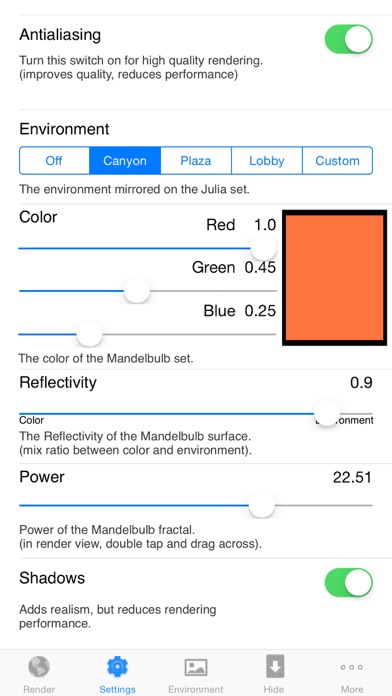
Double/Triple tap and drag the finger horizontally or vertically to change the shape of the Mandelbulb fractal. You can also set these constant in the Settings tab. The Settings tab also allows to enable an environment that is mirrored on the Mandelbulb fractal. The accuracy of the fractal surface can also be set here. If you have red-cyan glasses available, you can see the fractal with real depth by enabling stereo mode.

A one finger drag rotates the camera around the object, a two finger pinch is used for zooming and a three finger drag translates the camera. You can hide the tab bar to create a screen shot. Double tap to bring back the tab bar.

!!!! Important announcement !!!!
To take a screen shot, hold down the home button and then push the top button. The screen will flash and the resulting image will be placed on your camera roll. From there, you can sync it back to your computer, e-mail it to friends, or do anything else you can do with any other photo in your camera roll.

En voir plus...

Quoi de neuf dans la dernière version ?

- increased touch area of social media button
- fixed a bug with anti-aliasing
  • Screenshot #1 pour Mandelbulb Raytracer
  • Screenshot #2 pour Mandelbulb Raytracer
  • Screenshot #3 pour Mandelbulb Raytracer

D'autres applications du développeur

Galaxy ColliderGalaxy CollideriPhone

Note

(3 notes)

Détails sur l'application

Version
2.01
Taille
22.7 Mo
Version minimum d'iOS
11.0
Dernière mise à jour
09/12/2019
Publié par
Angisoft

Newsletter App Store

Recevez chaque jour les meilleures promos

Actualité Apple

Image iOS 27 bêta 5 : la liste des nouveautés
iOS 27 bêta 5 : la liste des nouveautés
Image iOS 27 affiche désormais 5G+ pour la 5G SA avec la bêta 5
iOS 27 affiche désormais 5G+ pour la 5G SA avec la bêta 5
Image iPhone 18 Pro Max : la batterie avec une plus grosse capacité se confirme
iPhone 18 Pro Max : la batterie avec une plus grosse capacité se confirme
Image Release candidate pour iOS 26.6.1, iOS 18.7.10 et macOS 26.6.2
Release candidate pour iOS 26.6.1, iOS 18.7.10 et macOS 26.6.2
iPhoneAddict Apps

Le catalogue iPhoneAddict pour suivre les nouveautés, mises à jour et baisses de prix de l’App Store.

Apps

Toutes les apps iOS iPhone iPad Universelles Mac Apple TV

iPhoneAddict

Actualité Apple Archives keynotes Contact À propos KultureGeek

Suivez-nous

©2009-2026 i2CMedia. Tous droits réservés.