
iPhoneAddict Apps
  • Actualités
  • Accueil Apps
  • iPhone
  • iPad
  • Universelles
  • Mac
  • Apple TV
KG KultureGeek
App
iPhone / iPad Télécharger iAddict v5 Mac Télécharger iAddict Mac
  • Actualités
  • Accueil Apps
  • iPhone
  • iPad
  • Universelles
  • Mac
  • Apple TV
  • Archives keynotes
  • Firmwares & iTunes
  • Contactez-nous
  • Comparateur de prix
  • KultureGeek
Accueil » Liste des Apps » Apps Universelles » Divertissement » Draw With Emoticons
L'application n'est plus disponible sur l'App Store français
1.0 iOS €Gratuit Iulai Baichurin 0 0 Swipe your finger across the screen and a trail of hearts will be left behind it. The slower your finger moves, the denser the emoticons will be. You can change the frequency with which emoticons appear on the screen using the bottom slider. You...
Draw With Emoticons

Draw With Emoticons

iOS Universel / Divertissement

Gratuit
Obtenir sur l'App Store
Facebook X E-mail

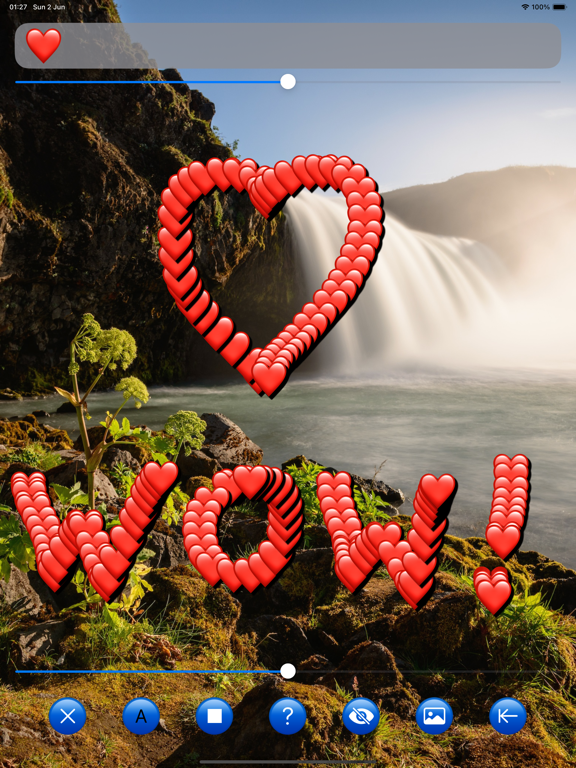
Swipe your finger across the screen and a trail of hearts will be left behind it. The slower your finger moves, the denser the emoticons will be.

You can change the frequency with which emoticons appear on the screen using the bottom slider.

You can drag any symbol on the screen to any location.

In the editor window located at the top of the screen, you can change the emoticon to another one or to letters.

The slider below it changes the size of the emoticons.

To remove all characters from the screen, press the left button.

The second button from the left allows you to change the color of the letters.

The third button from the left changes the background color.

The first button on the right deletes the last characters entered. The deletion frequency depends on the position of the lower slider.

The second button from the right allows you to place a photo from your gadget's photo library on the screen to draw on top of it.

To remove a photo from the screen, click on the same button and then select “cancel” from the menu.

The third button from the right can temporary remove controls from the screen if you want to take a screenshot.

To return the controls to the screen, touch it.
En voir plus...

  • Screenshot #4 pour Draw With Emoticons

Note

(0 note)

Détails sur l'application

Version
1.0
Taille
0.5 Mo
Version minimum d'iOS
15.0
Dernière mise à jour
02/06/2024
Publié par
Iulai Baichurin

Newsletter App Store

Recevez chaque jour les meilleures promos

Actualité Apple

Image iPhone : Apple a capté 49 % des revenus de smartphones au 2e trimestre, un record
iPhone : Apple a capté 49 % des revenus de smartphones au 2e trimestre, un record
Image L’iPhone Air 2 aurait une Dynamic Island plus petite et d’autres nouveautés
L’iPhone Air 2 aurait une Dynamic Island plus petite et d’autres nouveautés
Image iPhone 18e : les 9 Go de RAM se confirment un peu plus
iPhone 18e : les 9 Go de RAM se confirment un peu plus
Image Apple met à jour Shazam avec des autocollants iMessage pour l’album petal d’Ariana Grande
Apple met à jour Shazam avec des autocollants iMessage pour l’album petal d’Ariana Grande
iPhoneAddict Apps

Le catalogue iPhoneAddict pour suivre les nouveautés, mises à jour et baisses de prix de l’App Store.

Apps

Toutes les apps iOS iPhone iPad Universelles Mac Apple TV

iPhoneAddict

Actualité Apple Archives keynotes Contact À propos KultureGeek

Suivez-nous

©2009-2026 i2CMedia. Tous droits réservés.