AirWrite
iOS Universel / Divertissement
Write your own text in mid-air with your iPhone!
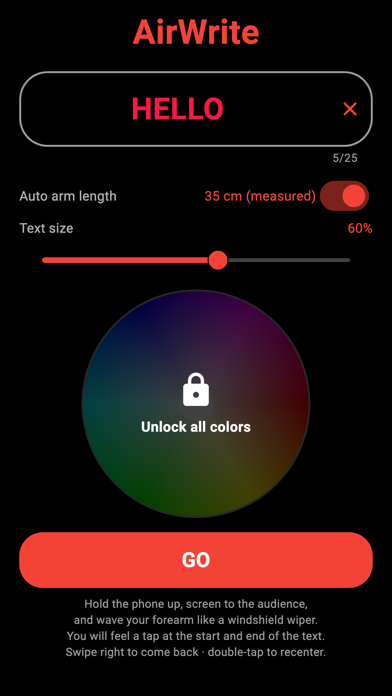
Type a message, press GO, hold the phone up and wave your forearm like a windshield wiper. AirWrite tracks the motion of your arm and keeps the letters frozen in the air — your message hangs in space as if painted with light.
A creative way to say HELLO at a concert, cheer someone from the crowd, find your ride at the airport, or just amaze your friends in the dark. You will definitely catch attention!
HOW IT WORKS
AirWrite models your arm as a compass: your elbow is the centre and the phone draws on the arc your hand traces. Motion sensors follow every swing with zero drift, so the text stays exactly where you "hung" it — even during fast waves. Letters curve along the arc, just like your hand moves.
SMART BY DESIGN
• No calibration — physics measures your arm length automatically while you wave
• Feel a gentle tap when you reach the beginning and the end of your message
• Double-tap to re-centre the text anywhere you like
• Adjustable text size, remembers your message and colour
• Works fully offline, nothing to sign up for
MADE FOR THE DARK
The display is pure black with nothing but your glowing message — perfect for night events, parties, and festivals.
PRO COLOURS
Writing in classic red is free forever. Unlock the full colour wheel once and paint the air in any colour you like — the purchase is yours for good and restores on any of your devices.
Take your phone, enter the text, and wave!
Quoi de neuf dans la dernière version ?
AirWrite 2.0 — rebuilt from the ground up:
• Drift-free motion tracking: the text now stays frozen in the air, no recalibration needed
• Letters curve along the arc of your wave for a natural look
• Automatic arm-length detection — physics measures your swing, nothing to configure
• Haptic taps mark the beginning and end of your message so you can keep it in view by feel
• Faster, smoother rendering that keeps up with quick waves
• Fresh settings screen: your text is previewed in its real colour as you type
• Double-tap to re-centre the text, swipe right to exit