iPhoneAddict Apps
  • Actualités
  • Accueil Apps
  • iPhone
  • iPad
  • Universelles
  • Mac
  • Apple TV
KG KultureGeek
App
iPhone / iPad Télécharger iAddict v5 Mac Télécharger iAddict Mac
  • Actualités
  • Accueil Apps
  • iPhone
  • iPad
  • Universelles
  • Mac
  • Apple TV
  • Archives keynotes
  • Firmwares & iTunes
  • Contactez-nous
  • Comparateur de prix
  • KultureGeek
Accueil » Liste des Apps » Apps Universelles » Autocollants » Sticker Studio - Creator
L'application n'est plus disponible sur l'App Store français
1.0.3 iOS €0,99€ Kris Rudolph 0 0 Unique sticker-making experience! No more messy-looking stickers. With Sticker Studio you can edit the path after you draw with your finger. Simply draw a path to cutout, and end the path near where you started to close the path automatically. Once...
Sticker Studio - Creator

Sticker Studio - Creator

iOS Universel / Autocollants

0,99€ au lieu de 1,19€
Acheter sur l'App Store
Facebook X E-mail

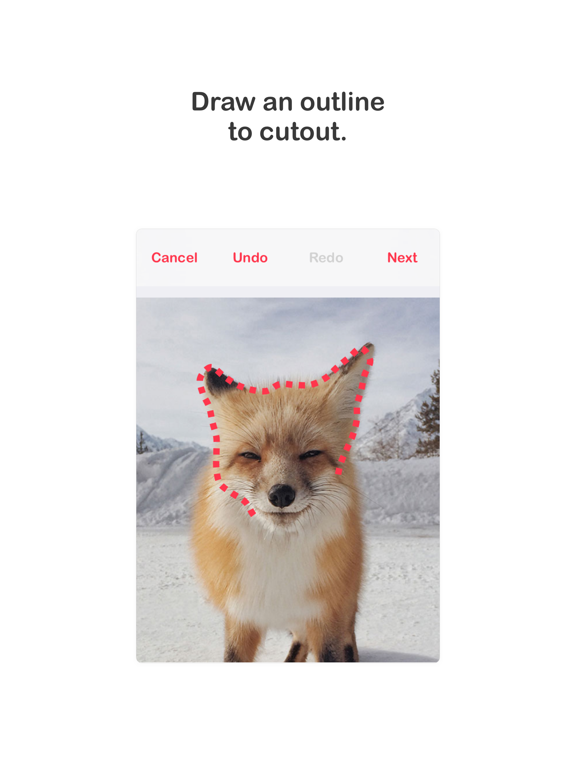
Unique sticker-making experience! No more messy-looking stickers. With Sticker Studio you can edit the path after you draw with your finger.

Simply draw a path to cutout, and end the path near where you started to close the path automatically.

Once the path is closed, you can drag the control points to adjust the path, add or remove more control points by double tapping, and zoom to get as fine-tuned as you like!

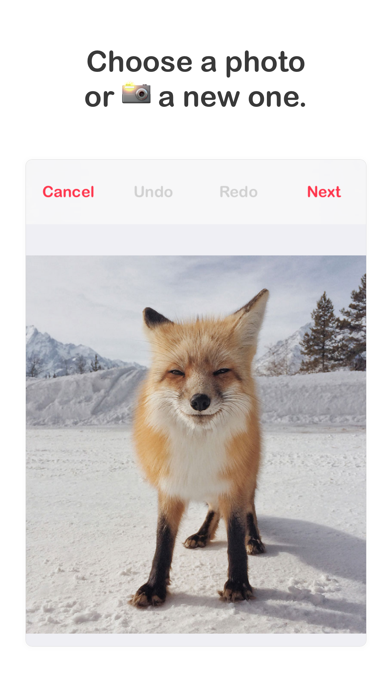
Sticker Studio also supports transparent PNGs, and you can save without cutting out a path. Now you can turn any image - transparent or not - into a sticker!

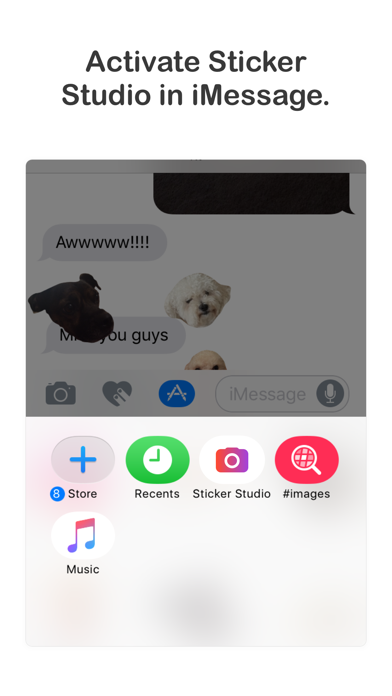
ACTIVATING STICKER STUDIO IOS11/12
1. Open an iMessage conversation
2. Tap the app button (illuminated in blue in the last screenshot)
3. Scroll to and tap the Sticker Studio icon
or
3. Add to favorites by scrolling right and tapping the three dot icon
4. Tap Edit, find Sticker Studio and add to favorites
6. Return to your conversation and use Sticker Studio!

ACTIVATING STICKER STUDIO IOS10
1. Open an iMessage conversation
2. Tap the app button (illuminated in blue in the last screenshot)
3. Tap the Store button
4. Select Manage
5. Find Sticker Studio in the list and activate it
6. Return to your conversation and use Sticker Studio!

En voir plus...

Quoi de neuf dans la dernière version ?

* Now when cutting out the path when creating a sticker, you'll see a "ghost" image of the full image behind, making it even easier to make precise edits!
* Reorder your stickers! Expand the view, tap "Edit" and simply hold and drag.
* Tapping a sticker will now send the raw image, so a friend can press and hold to save, and add it to their own stickers!
* Fixes and improvements to view boundaries
  • Screenshot #1 pour Sticker Studio - Creator
  • Screenshot #2 pour Sticker Studio - Creator
  • Screenshot #3 pour Sticker Studio - Creator
  • Screenshot #4 pour Sticker Studio - Creator
  • Screenshot #5 pour Sticker Studio - Creator
  • Screenshot #6 pour Sticker Studio - Creator

Note

(0 note)

Détails sur l'application

Version
1.0.3
Taille
23.2 Mo
Version minimum d'iOS
10.0
Dernière mise à jour
06/11/2018
Publié par
Kris Rudolph

Newsletter App Store

Recevez chaque jour les meilleures promos

Actualité Apple

Image Apple ajoute 43 appareils auditifs compatibles Made for iPhone (MFi)
Apple ajoute 43 appareils auditifs compatibles Made for iPhone (MFi)
Image Le prix de l’iPhone 17 augmenterait dans quelques jours
Le prix de l’iPhone 17 augmenterait dans quelques jours
Image Dopamine 3, le jailbreak pour iOS 26 sur iPhone, est disponible
Dopamine 3, le jailbreak pour iOS 26 sur iPhone, est disponible
Image L’App Store est en panne pour plusieurs utilisateurs, selon Apple
L’App Store est en panne pour plusieurs utilisateurs, selon Apple
iPhoneAddict Apps

Le catalogue iPhoneAddict pour suivre les nouveautés, mises à jour et baisses de prix de l’App Store.

Apps

Toutes les apps iOS iPhone iPad Universelles Mac Apple TV

iPhoneAddict

Actualité Apple Archives keynotes Contact À propos KultureGeek

Suivez-nous

©2009-2026 i2CMedia. Tous droits réservés.